From the blog
Best Recipe Manager Apps (2026)
Nine recipe manager apps compared: Paprika, Recipe Keeper, Crouton, Mela, ReciMe, CookBook, Deglaze, RecipeSage and Pantry Pal. Prices, platforms and imports, checked October 2026.
Last updated
A recipe manager app holds every recipe you care about, from websites, videos, cookbooks and cards, and finds the right one when you’re standing in the kitchen. Nine of them are worth your time in 2026. The best one for you depends mostly on how you want to pay and which devices are in your house.
Already know you want a recipe manager that knows what’s in your kitchen? Skip the comparison and see Pantry Pal’s recipe manager. It’s free to start, no credit card, and it runs in your browser. Everyone else, read on.
Which recipe manager app is best?
Paprika is the safest pick for a one-time price, with a 4.9 rating from over 54,000 iPhone reviews, but you buy it once per platform. Crouton is the best-designed choice if everyone in your house is on Apple devices. ReciMe, Deglaze and CookBook import from the most social platforms, on iPhone and Android, and ReciMe keeps meal planning on its free plan. RecipeSage is free. Pantry Pal is for people who want their recipes sorted by what’s already on the shelf.
The nine recipe manager apps, side by side
Every price, platform and feature below was checked against each vendor’s own site and app store listings on 13 October 2026. Prices are in US dollars.
| App | Price | Platforms | Imports from | Pantry | Best for |
|---|---|---|---|---|---|
| Paprika 3 | $4.99 iPhone/Android, $29.99 Mac/Windows, each bought once | iOS, Android, Mac, Windows | Websites, other recipe apps’ files | Yes, with expiry dates | A one-time price and a proven app |
| Recipe Keeper | Free; Pro $19.99 iPhone/Android, $29.99 Mac/Windows, once each | iOS, Android, Mac, Windows | Websites, Instagram, TikTok, photos, PDFs, other apps | No | Scanning a paper collection, paid once |
| Crouton | Free; Plus $24.99 once; Discover $1.99/mo or $14.99/yr | iPhone, iPad, Mac, Apple Watch, Vision Pro | Websites, cookbook scans, photos, handwriting, PDFs | No | The best cooking experience on Apple |
| Mela | Free download; $6.99 iPhone/iPad, $14.99 Mac, once each | iPhone, iPad, Mac | Websites, video descriptions, cookbook scans, Paprika files | No | A clean, simple Apple app |
| ReciMe | Free (5 imports/week); Plus $39.99/yr | iOS, Android, web (beta) | Instagram, TikTok, YouTube, Facebook, Pinterest, websites, photos | No | Social recipes, with planning on the free plan |
| CookBook | Free (20 recipes); Pro $6.99/mo or $39.99/yr | iOS, Android, web | Websites, Instagram, TikTok, Facebook, YouTube, Pinterest, photos, PDFs | No | Importing from anywhere, on any device |
| Deglaze | Free (weekly import cap); Pro $49.99/yr | iOS, Android, web | Websites, Instagram, TikTok, YouTube, Facebook, Pinterest, photos | No | Saving recipes from social video |
| RecipeSage | Free; optional donations | Web, Android, Windows, Mac, Linux | Websites, photos, handwritten cards, PDFs and documents, 25 apps | No | A free, full-featured manager |
| Pantry Pal | Free to start; Pro $6.99/mo or $39.99/yr | Web app (any browser) | Websites, TikTok, Instagram, YouTube, cookbook photos, EPUB, PDF | Yes | Cooking from recipes and food you already have |
Group 1: pay once, buy per platform
The two big names in the category. Both sell a one-time unlock instead of a subscription, and both charge again for each kind of device you own.
Paprika 3: best for a one-time price and a proven app
Best for: people who want to pay once and stop thinking about it. Paprika has been the default recommendation for years and its ratings show why: 4.9 from over 54,000 reviews on the US App Store, and 4.9 from about 20,000 on Google Play. You save recipes with its built-in browser, a bookmarklet or the Safari extension, and bring old collections in from apps like MasterCook and MacGourmet. There’s a meal planner, a grocery list that merges ingredients and sorts by aisle, and a pantry that records quantity, purchase date and expiry date for each item. Sync is included with every paid copy.
The catch is that each version is sold separately. It’s $4.99 on iPhone, $4.99 to unlock on Android, and $29.99 each for Mac and Windows. Paprika 3 only imports from web pages and other apps’ files, with no photo, PDF or video import, and a household shares one login. There’s also a transition coming. Paprika 4 opened a public beta to current owners on 28 September 2026. The vendor says it will be free to download everywhere, with photo and handwriting scanning, TikTok, Instagram, Facebook and YouTube import, and separate family logins on a Premium subscription. No price or release date has been published, so if you buy today, you’re buying Paprika 3.
Recipe Keeper: best for scanning a paper collection, paid once
Best for: turning a drawer of printouts and cookbook pages into a searchable library without a subscription. Recipe Keeper scans recipes from your camera, your photos or PDF files and converts them to text. It also saves from websites, Instagram and TikTok, takes pasted text, and imports from a long list of other apps, Paprika included. There’s a weekly and monthly meal planner, multiple shopping lists grouped by aisle, and Alexa support for hands-free cooking. It rates 4.8 from over 30,000 reviews on the US App Store.
The catch is the same per-platform pricing as Paprika. The app is free to download with a recipe limit, and the Pro upgrade costs $19.99 on iPhone or Android and $29.99 on Mac or Windows, bought separately for each. There’s no web app. There’s no pantry either: its leftovers feature is a recipe search, not a list of what you own.
Group 2: Apple-only and design-led
If every phone, tablet and laptop in your house is an Apple device, these two are the nicest apps in the category to actually cook from. If anyone uses Android or Windows, skip this group.
Crouton: best cooking experience on Apple devices
Best for: people who care how an app feels at the stove. Crouton won an Apple Design Award in 2024, and it rates 4.8 from about 2,900 reviews on the US App Store. It runs on iPhone, iPad, Mac, Apple Watch and Vision Pro. It imports from websites, scans cookbook pages and handwritten notes, reads photos, PDFs and plain text, and as of September 2026 takes structured recipe files. Its step-by-step cooking mode starts timers straight from the steps and can show live readings from a Combustion thermometer. Meal plans can be generated for you, shopping lists go to Apple Reminders, and recipes and meal plans sync and share through iCloud.
The catch is the pricing, and the fact that it only runs on Apple devices. Crouton is free to download, then Crouton Plus is a one-time $24.99, and a separate Discover subscription ($1.99 a month or $14.99 a year) unlocks some newer features, such as ingredient substitutions. Its website and App Store listing don’t claim import from TikTok, Instagram or YouTube. And there’s no Android or web version. (We compared the two in more detail in Pantry Pal vs Crouton.)
Mela: best for a clean, simple Apple app
Best for: a calm, uncluttered recipe library on iPhone, iPad and Mac. Mela imports from web pages, uses machine learning when a page’s recipe data is missing, pulls recipes from YouTube, TikTok and Instagram video descriptions, and scans cookbook pages with your camera. It reads Paprika export files, so moving over is easy. Meal plans are stored in the Calendar app and grocery lists in Reminders, so a shared Reminders list works for the whole household. Apple has given it an Editors’ Choice badge, and it rates 4.6 from about 900 US reviews.
The catch is the per-platform price. Mela is free to download but needs a one-time purchase to unlock everything, sold separately on each platform at $6.99 for iPhone and iPad and $14.99 for Mac. Sharing is all or nothing, so when you invite someone through iCloud, they get every recipe and can edit or delete any of them. The most recent iPhone update was in June 2025, so don’t expect a fast pace of new features.
Group 3: mobile-first, built for social media imports
These three are phone apps first. All of them save recipes from Instagram, TikTok, YouTube, Facebook and Pinterest, and each has a web app alongside. You pay a subscription to lift the import limits.
ReciMe: best for social recipes with planning on the free plan
Best for: saving recipes from your feed without paying for the basics. ReciMe is free for up to 5 recipe imports a week, and ReciMe Plus costs $39.99 a year in the US, with a 7-day free trial on the yearly plan. There’s a monthly plan too, but ReciMe doesn’t publish its price outside the app. The free plan includes meal plans, grocery lists sorted by aisle, and cookbooks; Plus adds unlimited imports, cookbook and handwritten-recipe scanning, step-by-step cooking, nutrition and export. It imports from Instagram, TikTok, YouTube, Facebook, Pinterest, websites, screenshots and photos, and it’s the most-rated app here, at 4.8 from over 300,000 reviews on the US App Store.
The catch is outside the phone. The web app is in beta, works on computers only, and doesn’t have meal plans or grocery lists yet. Sharing with your household means logging into one shared account on every device. ReciMe doesn’t import PDFs, and it has no pantry. (We compared the two in Pantry Pal vs ReciMe.)
CookBook: best for importing from anywhere, on every platform
Best for: pulling recipes in from everywhere. CookBook (listed on the App Store as “Recipe Keeper: CookBook”, not to be confused with the Recipe Keeper above) imports from Instagram, TikTok, Facebook, YouTube, Pinterest and websites, plus photos of handwritten cards, cookbook pages, screenshots and clippings, and PDFs. Its Leftovers tool searches your saved recipes by ingredients you type or photograph, and shows how many of them each recipe uses. It runs on iOS, Android and the web at app.cookbookmanager.com, and rates 4.8 from about 2,700 US App Store reviews.
The catch is the free plan, which stops at 20 recipes and 20 imports. Pro is $6.99 a month or $39.99 a year, which is also where meal planning lives. CookBook doesn’t offer linked household accounts; its own help centre says to share your login or keep separate accounts. And it doesn’t keep a pantry. In its own words, ingredient search “does not maintain a live pantry inventory.”
Deglaze: best for saving recipes from social video
Best for: people whose recipes mostly come from their feed. Deglaze imports from Instagram posts and Reels, TikTok, YouTube (Shorts included), Facebook Reels, Pinterest and websites, plus cookbook pages and screenshots. It runs on iOS, Android and the web at web.deglaze.app. Household members each get their own account, sharing one library, grocery list and meal calendar, and you can see who added what to the list. It rates 4.9 from about 4,000 reviews on the US App Store and updates often.
The catch is that most of the planning sits behind Pro. The free plan includes “a limited number of recipe imports per week,” and Deglaze doesn’t publish the number. Pro is $49.99 a year, and the meal planner and aisle-sorted grocery list are both Pro features. Deglaze doesn’t claim PDF import. It has no pantry; its own comparison with Paprika says it “doesn’t currently offer this.”
Group 4: browser-first
These two are built to run in a web browser, so they work on whatever device you have in hand.
RecipeSage: best free recipe manager
Best for: anyone who wants a full-featured manager without paying. RecipeSage is free, with no ads, no trial and nothing behind a paywall; it asks for optional donations instead. It runs on the web, on Android, and as a desktop app for Windows, Mac and Linux, and you can host it yourself. It creates recipes from a URL, a photo of a cookbook page or handwritten card, and documents including PDF and Word files, and bulk-imports from about 25 other apps, Paprika, Mela and Crouton among them. There’s a drag-and-drop meal planner, a shopping list grouped by aisle, and shared plans and lists. Its Search by Ingredients tool ranks your recipes by how many of the ingredients you list they use.
The catch is polish. By its own description it’s a one-person hobby project, and the design is functional rather than polished. On iPhone, its download page points you to Safari’s “Add to Home Screen” rather than an App Store app. Donors get a higher daily allowance for imports and image recognition, but the free daily limit isn’t published. There’s no pantry list.
Pantry Pal: best for cooking from what’s already in your kitchen
Best for: people who have plenty of recipes and plenty of food, and still can’t decide what to make. Pantry Pal is our app. It does the recipe-manager job: you paste a link from any site, save from a TikTok, Instagram or YouTube video, photograph a cookbook page, upload an EPUB or PDF, paste the text from an email, or type one in.
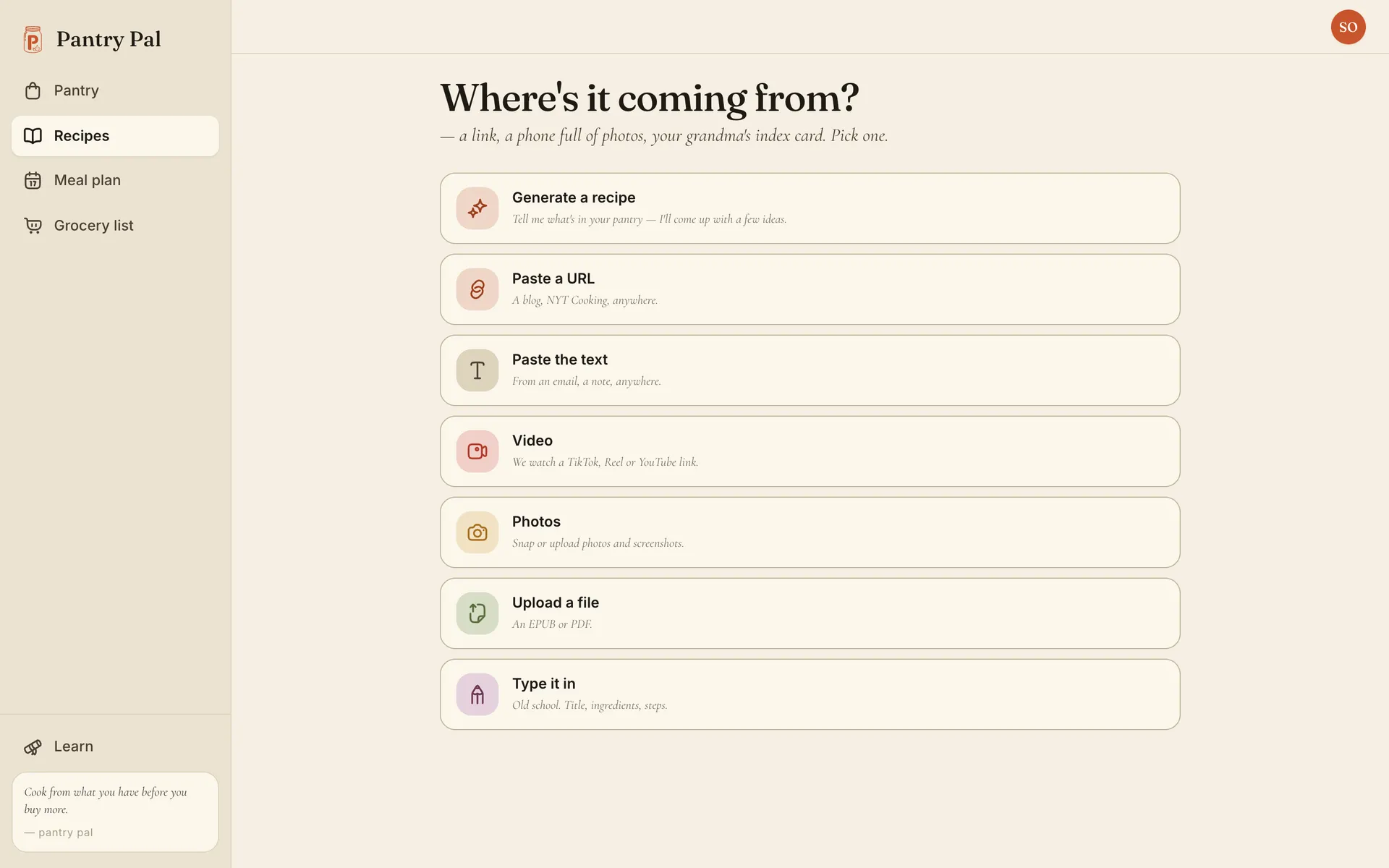
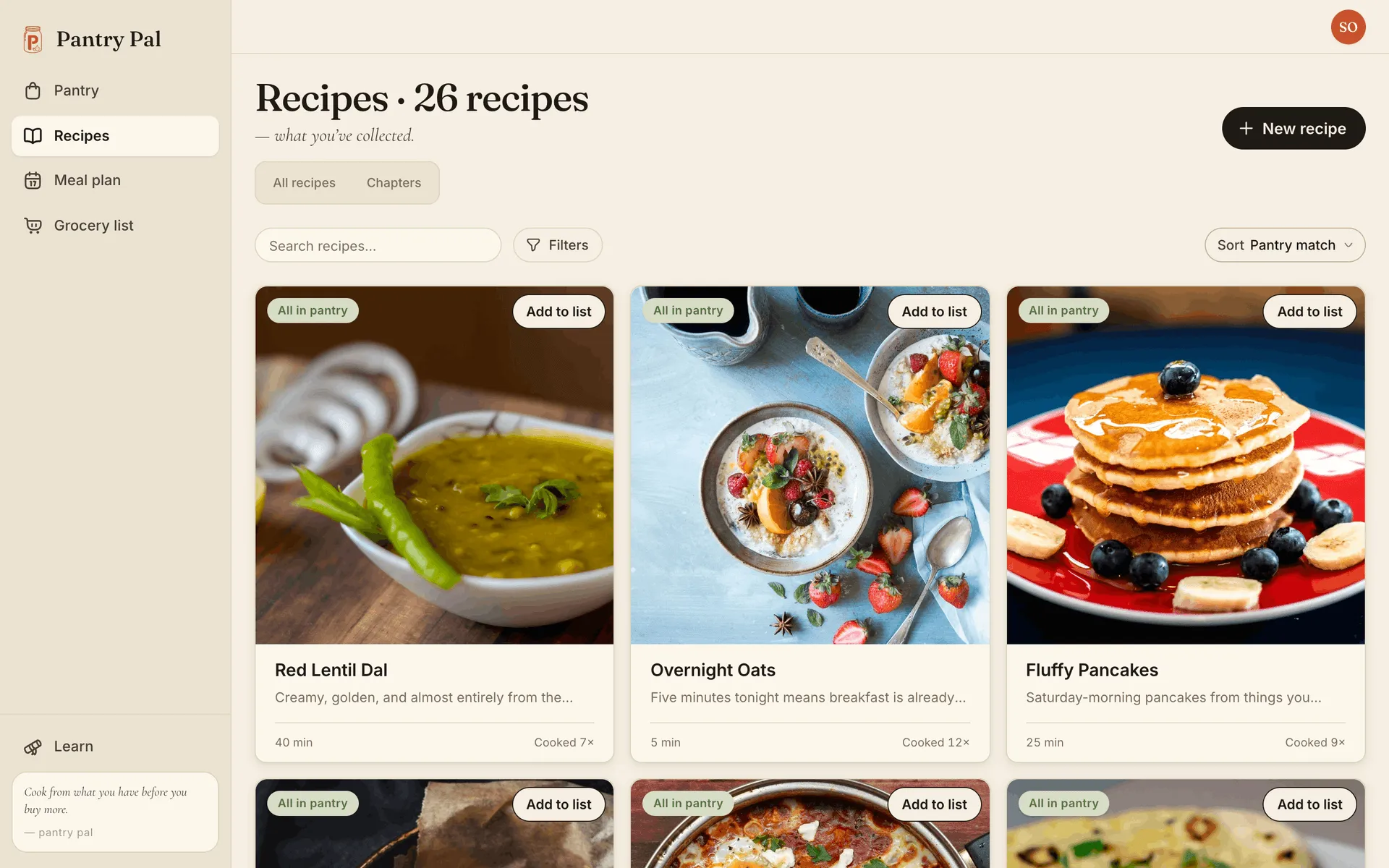
Then it keeps your pantry on file between visits and sorts your recipes by how much of each you already have. The ones you can cook tonight come first, and the rest say how many things you’d need to buy.
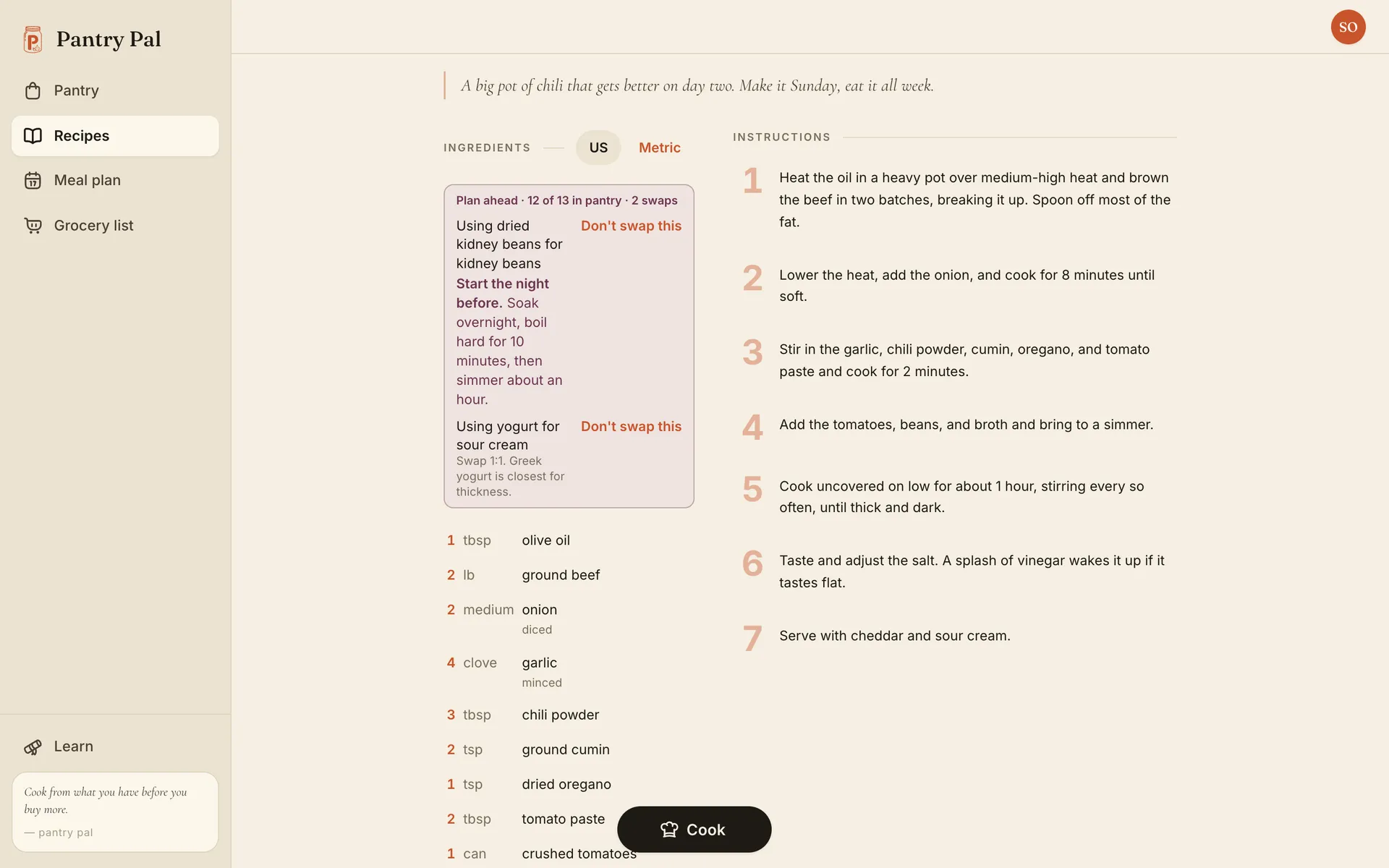
When something on your shelf can stand in for a missing ingredient, the recipe page suggests the swap and counts how much of the recipe you already have.
It runs in any browser, on a phone or a laptop, and everyone in your household shares the same cookbook, pantry and grocery list. It’s free to start with no credit card. Every new household gets 30 days of everything, then the free plan includes 5 recipe imports and 5 recipe ideas a month, one grocery list and two people, with no cap on how many recipes you keep. (A recipe idea is written from your pantry and stays an idea until you save it to your recipes.) Pro ($6.99 a month or $39.99 a year) makes imports and ideas unlimited and adds meal planning and hands-free cook mode.
The biggest catch is that there’s no native iPhone or Android app yet. It’s a web app, so you won’t find it in the App Store. The pantry is only as current as you keep it; buying groceries doesn’t add them for you. ReciMe, CookBook and Deglaze import from more places, including Pinterest and Facebook, and CookBook reads handwritten cards. And Pro costs more than any of their paid plans. If you don’t want to keep a pantry at all, one of the apps above will serve you better.
Which one should you pick?
- You want to pay once and you use one or two kinds of device → Paprika 3, or Recipe Keeper if you’re scanning a lot of paper.
- Everyone in your house uses Apple devices and you care about design → Crouton, or Mela for something simpler.
- Your recipes mostly come from Instagram and TikTok → Deglaze, or ReciMe if you want meal planning on a free plan.
- You want the most import sources on iPhone, Android and the web → CookBook.
- You don’t want to pay anything → RecipeSage.
- You want your recipes sorted by what’s already in your pantry → Pantry Pal.
If you’re moving between apps, most of them import from Paprika, so a Paprika export is the closest thing this category has to a common format. And if what you want tonight is a dinner rather than a filing system, here’s our list of apps that find recipes from the ingredients you have.
Frequently asked questions
What is the best recipe manager app?
It depends on how you pay and what you cook on. Paprika is the long-standing favourite for a one-time price, with a 4.9 rating from over 54,000 iPhone reviews. Crouton is the best-designed app if your whole household uses Apple devices. ReciMe, Deglaze and CookBook import from the most social platforms, on iPhone and Android. RecipeSage is free. Pantry Pal is the one built around your pantry, so it sorts your saved recipes by what you already have.
Is there a free recipe manager app?
RecipeSage is free outright, with no ads and no paywall, and asks for optional donations. ReciMe, CookBook, Deglaze and Pantry Pal have capped free plans: ReciMe allows 5 imports a week, Deglaze caps imports each week without publishing the number, CookBook stores 20 recipes, and Pantry Pal gives you 5 imports a month with no cap on how many recipes you keep. Paprika has a free version on Android and a free trial on Windows, both capped at 50 recipes, and the free version of Recipe Keeper limits how many recipes you can add until you buy Pro.
Which recipe manager app is a one-time purchase?
Paprika 3, Recipe Keeper and Mela all sell a one-time unlock, priced per platform. Paprika is $4.99 on iPhone and $29.99 on Mac or Windows. Recipe Keeper Pro is $19.99 on iPhone or Android and $29.99 on Mac or Windows. Mela is $6.99 on iPhone and iPad and $14.99 on Mac. Crouton sells a one-time Plus unlock for $24.99, with a separate Discover subscription for some newer features.
Is Paprika 4 out?
Not yet. Paprika 4 opened a public beta to current users on 2026-09-28. The vendor says it will be free to download on every platform, with premium features such as recipe scanning, social media import and family logins on a subscription. No Premium price or release date has been published. Paprika 3 is still the version on sale.
Which recipe manager works on iPhone, Android and the web?
CookBook and Deglaze both have iPhone and Android apps plus a web app, on one account. ReciMe has iPhone and Android apps and a web app in beta, which does not have meal plans or grocery lists yet. RecipeSage runs on the web, Android and desktop, and on iPhone through a home-screen web app. Pantry Pal is a web app that works in any browser, on a phone or a computer. Paprika and Recipe Keeper have no web app, and Crouton and Mela are Apple-only.
Which recipe manager app keeps track of my pantry?
Paprika has a pantry that records quantity, purchase date and expiry date for each item. Pantry Pal keeps a pantry too, and sorts your saved recipes by how much of each one you already have. CookBook and RecipeSage can rank your recipes against ingredients you enter, but neither keeps a pantry list. Recipe Keeper, Crouton, Mela, ReciMe and Deglaze have no pantry.