From the blog
How to make a grocery list from recipes without buying what you already have
How to make a grocery list from recipes in four steps: merge the lines, cross off what you own, sort by aisle. Then let the list build itself.
You’ve picked three recipes for the week, and now you have to turn them into one list you can shop from. To make a grocery list from recipes, write down every ingredient line, merge the duplicates, cross off what you already have, and sort what’s left by store section. The third step is the one almost everyone skips, and it’s why you come home with a fourth jar of cumin.
If you got here asking the question from that Reddit thread, “is there an app where you put in your recipes and it builds the list?”, the answer is yes. I’ll show you how Pantry Pal does it further down, along with a grocery list that starts from your pantry. The manual method comes first, because it works with a pen and it explains what any tool should be doing for you.
How to make a grocery list from recipes, by hand
1. Pick the recipes first, then stop
Decide what you’re cooking before you write a single ingredient. Three or four dinners is a realistic week for most people. Leave the “maybe” recipes off. Every recipe you add makes the next three steps longer.
2. Merge the ingredient lines
Copy every ingredient from every recipe onto one page, then combine the repeats. If the lasagna wants one onion and the burgers want one onion, that’s one line: 2 onions. Add up quantities when the units match. When they don’t (a cup of grated parmesan here, a 200 g wedge there), write both and decide in the store.
This is the step people expect to be the hard one. It’s tedious, not hard.
3. Subtract what you already have
Now go and look. Open the fridge, the cupboard, and the spice drawer, and cross off every line you can already cover. Don’t do it from memory. Memory says you have eggs. The carton says you have one.
This is the step that decides whether the list is right, and it’s the one that gets skipped. It needs you standing in the kitchen with the list in hand, and by then you’ve already spent ten minutes on step 2. So people skip it and buy everything, and the shelf fills with duplicates of things that were already there. A grocery list built without step 3 is just a copy of the recipes.
4. Group by store section
Rewrite what’s left in the order you walk the store: produce, bakery, meat, dairy, then the dry goods and canned aisles. It takes two minutes and saves you doubling back for the one thing you missed in aisle 3.
That’s the whole method. It works, and it takes about 20 minutes a week, mostly on steps 2 and 3.
Letting the recipes build the list
Pantry Pal keeps your recipes and what’s in your pantry in one place, so it can do steps 2 to 4 for you. Steps 2 and 4 are bookkeeping. Step 3 is the one that matters, and it’s the one it never skips.
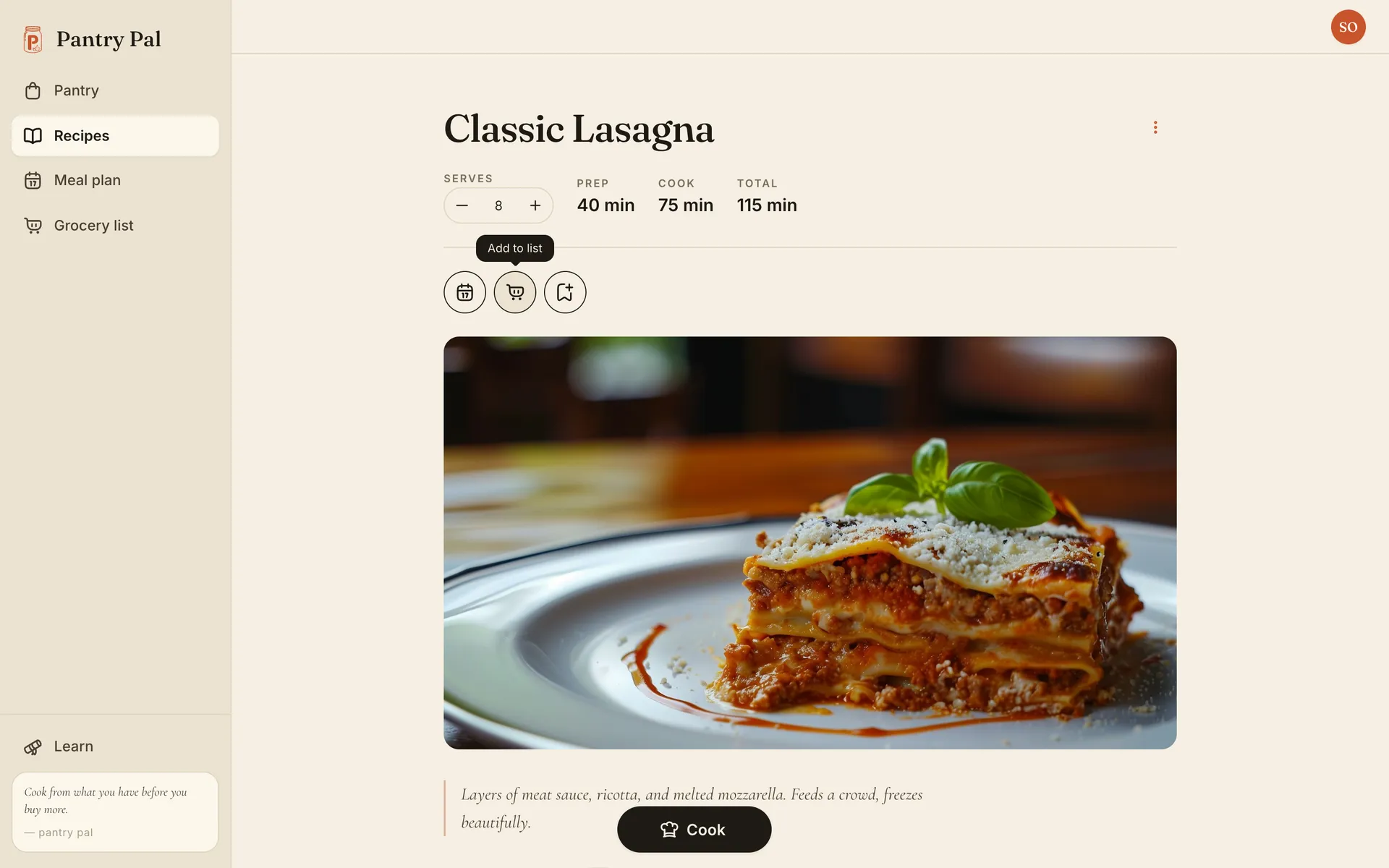
Once you have a list, every recipe has an Add to list button at the top, next to the meal plan and chapter buttons.
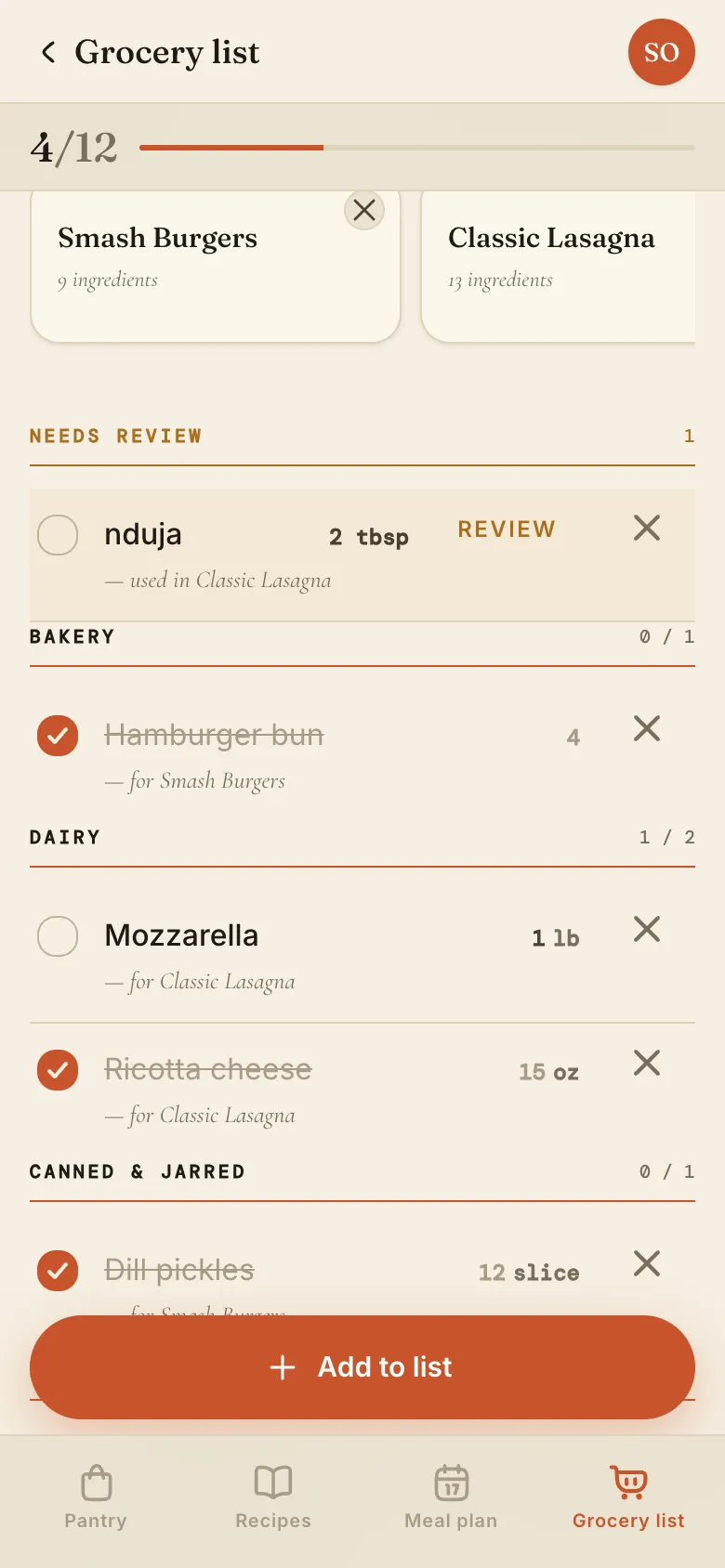
Here’s what happens when you press it. This list already had Smash Burgers and three things typed by hand (coffee beans, sparkling water, paper towels). I added Classic Lasagna, which calls for 13 ingredients. The pantry already covers 9 of them and one needs a look, so only 3 lasagna lines go on the list: ricotta, mozzarella, and lasagna noodles. Ground beef, onion, garlic, crushed tomatoes, and the rest never appear, because they’re already on the shelf.
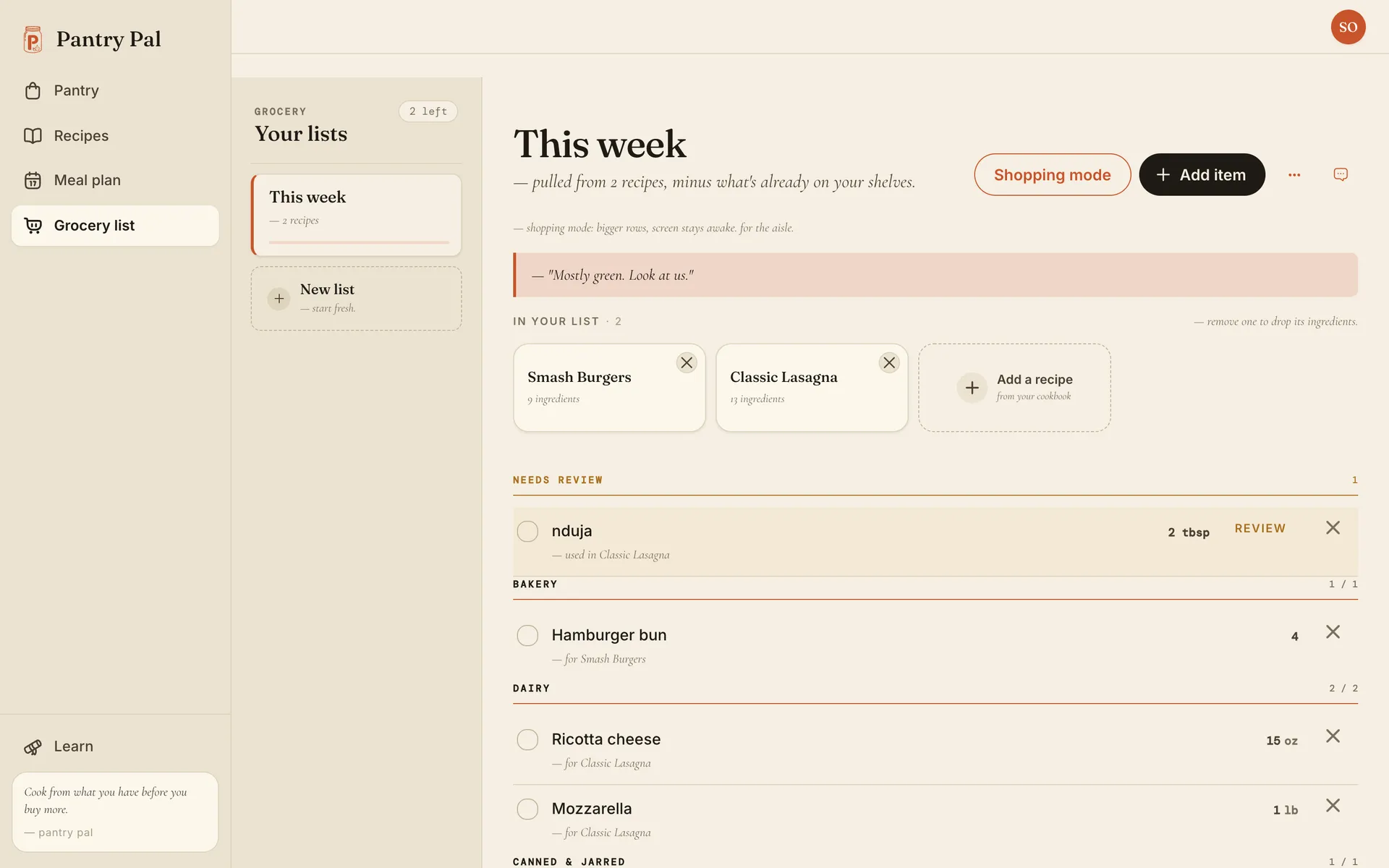
Each line says which recipe it’s for, so you can see why it’s there. Remove a recipe from the strip at the top and its ingredients leave with it. When two recipes need the same ingredient, they share one row, and the quantities add up when the units match.
The line it can’t place
Sometimes a recipe calls for something the app doesn’t recognize. Here it’s nduja, a spicy spreadable sausage, sitting under Needs review instead of in a section. Pantry Pal doesn’t guess what nduja is or where it’s sold, so it asks you once.
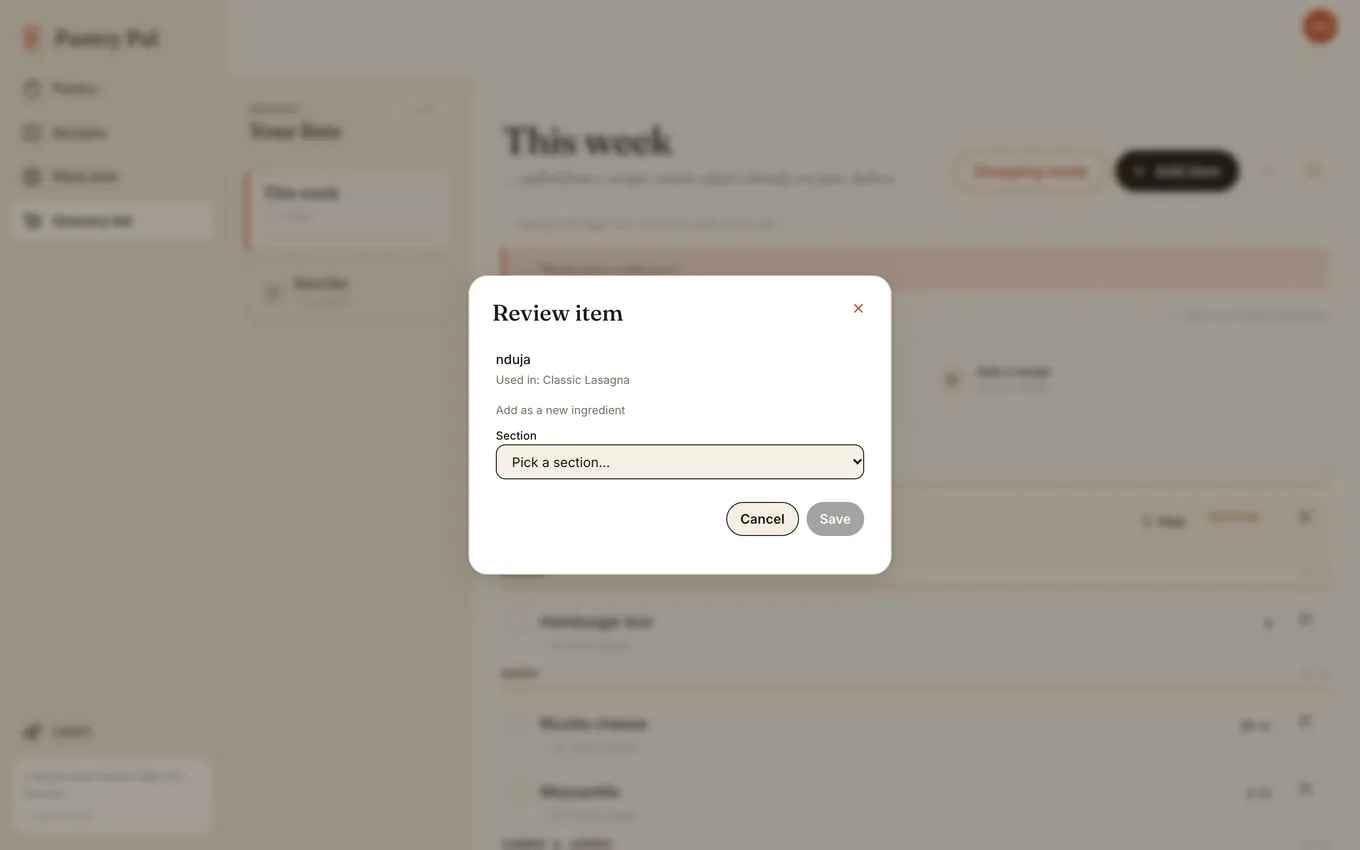
Pick a section and save. Nduja becomes an ingredient in your household and moves into that section, and every recipe that mentions it now links to it.
Sorted the way you shop
Everything else lands in store sections: Bakery, Dairy, Canned & Jarred, Dry Goods & Pasta, Condiments & Sauces. Things you typed by hand go under Added manually at the bottom, unless you gave them a category when you added them. Each section header counts what’s left, so you can tell at a glance whether you’re done with dairy.
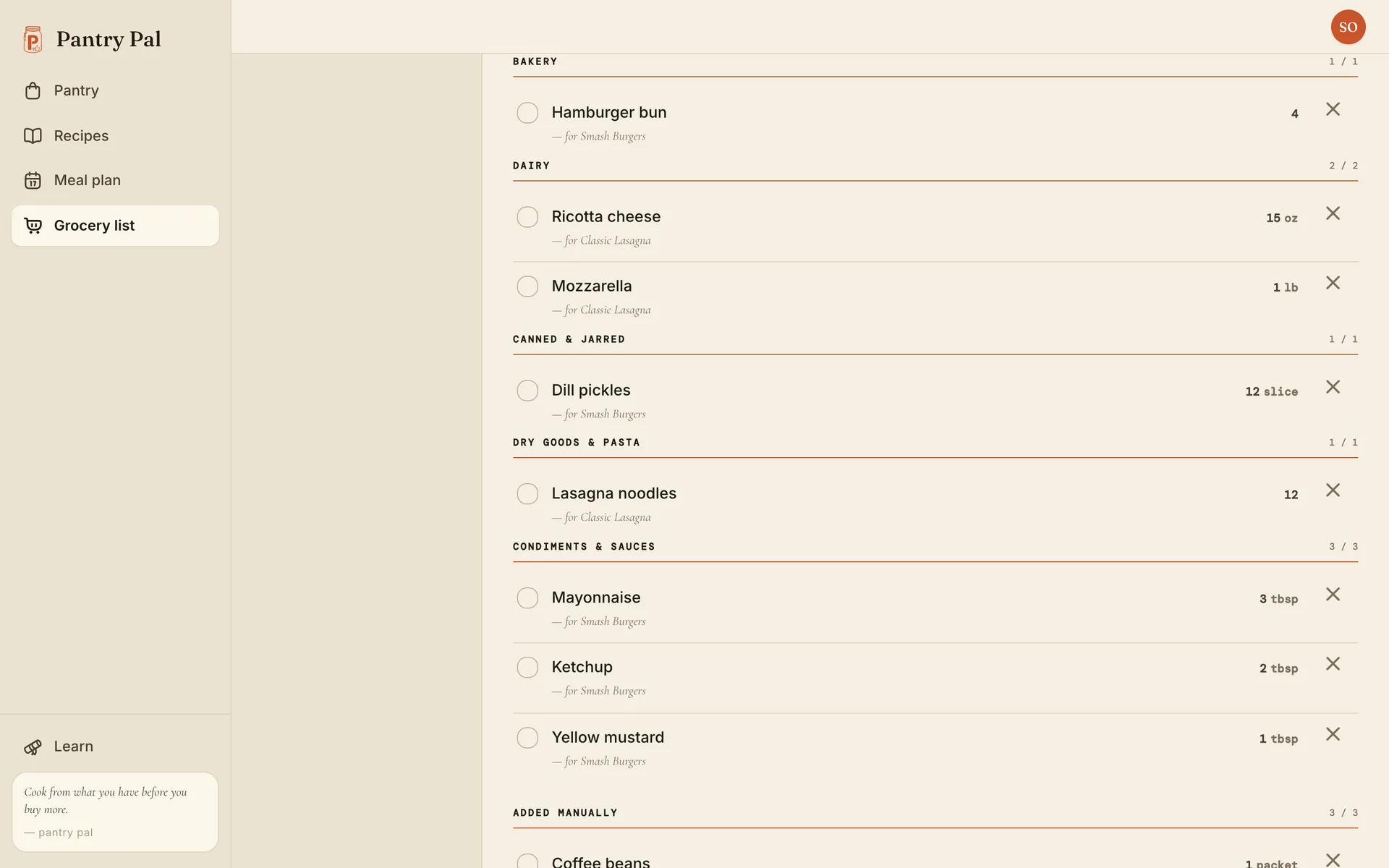
If your store puts dairy at the front, drag the sections into your own order in Settings, under Lists & customization. The list follows that order from then on.
A whole week at once
Adding recipes one at a time is fine for a couple of dinners. If you plan the week on the meal plan, Add to grocery list sends every planned meal in one go. Before you commit, it shows each meal and how many of its ingredients you still need to buy. Here, four of the six meals read “all on hand,” and the whole week comes to 10 things to grab.
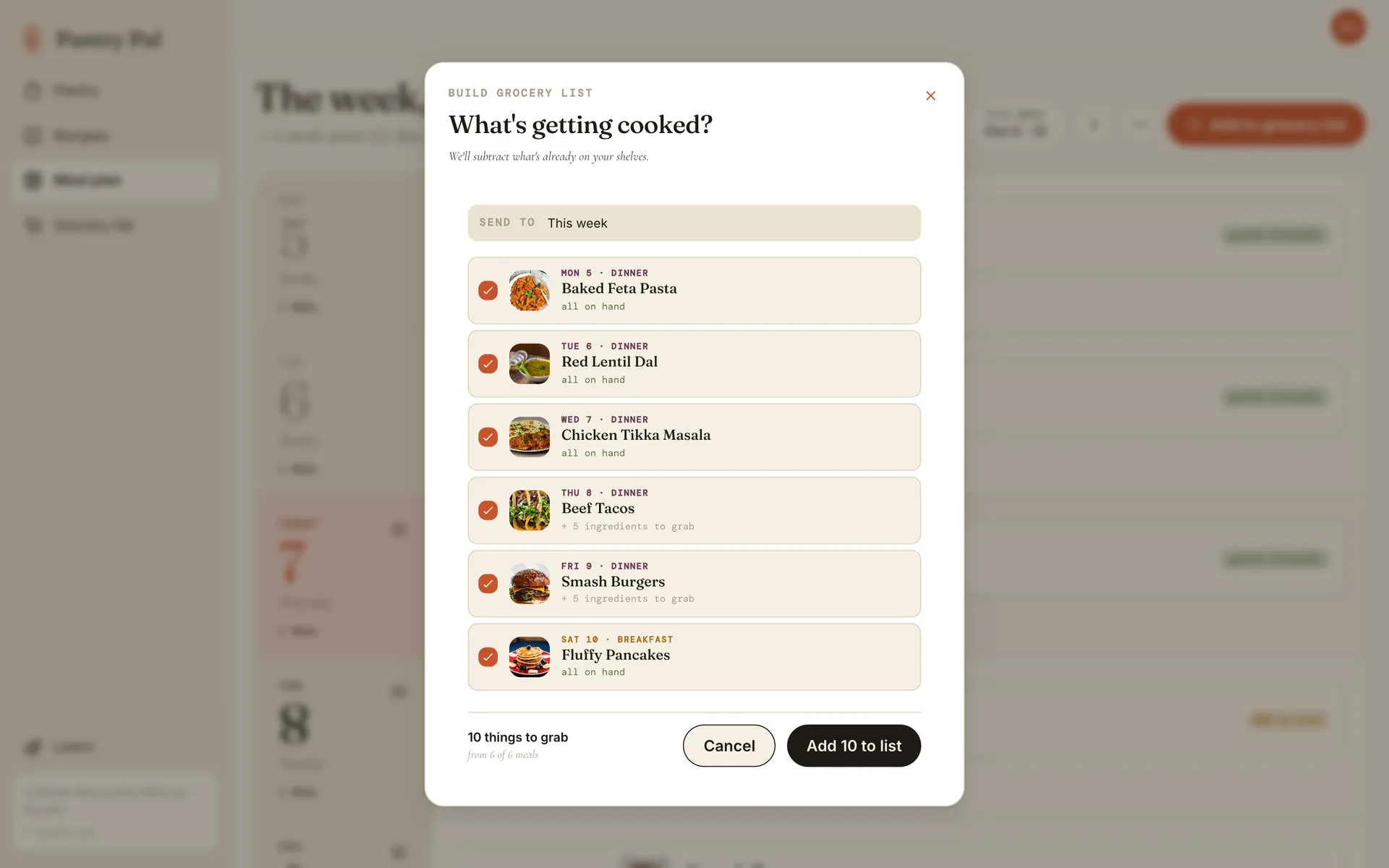
Untick a meal to leave it off. Press the button and the recipes join the list, with the same subtraction as before.
In the store
The list is meant for your phone in the aisle. Tick an item and it’s crossed out and drops to the bottom of its section, so what’s left stays at the top. The bar at the top counts how many you’ve got.
What’s free
The grocery list is on the free plan. You get one list with no cap on items, and adding recipes to it with the pantry subtraction costs nothing. More than one list, and the meal plan that sends a whole week to the list, are part of Pro. Every new account gets both for the first 30 days, no credit card needed. The details are on the pricing page.
Try it this week
Do it by hand once. Pick three recipes, merge the lines, then stand in the kitchen and cross off what you have. You’ll be surprised how much of the list goes. If you’d rather not do step 3 every Sunday, a grocery list that starts from your pantry does it each time you add a recipe.
Frequently asked questions
Is there an app that builds a grocery list from your recipes?
Yes. Several meal-planning apps turn recipes into a shopping list. Pantry Pal does it from your own saved recipes and also checks the list against your pantry, so anything you already have never shows up. You add a recipe to the list, or send a whole week of planned meals at once.
How do I make a grocery list from several recipes at once?
Write out every ingredient line from every recipe, merge the duplicates so two recipes asking for onions become one line, cross off everything you already have at home, then group what is left by store section. Crossing off what you have is the step most people skip, and it is why the list ends up wrong.
Is the grocery list free in Pantry Pal?
Yes. The free plan keeps one grocery list with no limit on items, and adding recipes to it is free. Meal planning, including sending a whole planned week to the list, and more than one list are part of Pro. New accounts get both free for the first 30 days.