From the blog
Best Apps to Save Recipes From Social Media (2026)
Eight apps that save recipes from Facebook, Instagram, TikTok, YouTube and Pinterest, compared: which platforms each one takes, whether it reads the caption or the video, and what it costs. Checked October 2026.
Last updated
The best app to save recipes from social media is the one that takes the platform your recipes come from and reads the video when the caption is empty. ReciMe, Deglaze and Plan to Eat take Facebook, Instagram, TikTok, YouTube and Pinterest, and all three can work from the video itself. CookBook takes the same five but reads only the caption. ReciMe has the most useful free plan.
Already know you want a recipe from a TikTok, Reel or YouTube video as searchable text? Skip the comparison and see Pantry Pal’s video importer. It’s free to start, no credit card, and it runs in your browser. It doesn’t take Facebook; the rest of this page covers the apps that do.
Which app saves recipes from Facebook, Instagram and TikTok?
People search for Facebook recipes more than for TikTok or Instagram ones, so start there. ReciMe, Deglaze, CookBook and Plan to Eat all say they import Facebook posts and Reels as well as Instagram, TikTok, YouTube and Pinterest. The Paprika 4 beta adds Facebook, Instagram, TikTok and YouTube on its Premium plan. AllSpice names Instagram, TikTok and YouTube. Samsung Food saves from websites and publishes nothing about video. Pantry Pal takes TikTok, Instagram and YouTube, not Facebook or Pinterest.
The eight apps, side by side
Every platform, price and limit below was checked against each vendor’s own site, help centre and US App Store listing on 13 October 2026. “Not published” means the vendor doesn’t say, not that the feature is missing.
| App | TikTok | YouTube | What it reads | Free plan | Paid | Platforms | |||
|---|---|---|---|---|---|---|---|---|---|
| ReciMe | Posts, Reels | Yes | Yes | Yes | Yes | Caption, then the audio, then the linked site | 5 imports a week | Plus $39.99/yr | iOS, Android, web (beta) |
| Deglaze | Posts, Reels | Yes | Yes | Incl. Shorts | Yes | Caption, audio, on-screen text, scenes | Weekly cap, number not published | Pro $49.99/yr | iOS, Android, web |
| Plan to Eat | Posts, Reels | Yes | Yes | Yes | Yes | Caption and comments; audio and on-screen text on Instagram and Facebook | None (14-day trial) | $5.95/mo or $49/yr on the web | iOS, Android, web |
| CookBook | Posts, Reels | Yes | Yes | Yes | Yes | Caption, or the page the post links to | 20 recipes | Pro $6.99/mo or $39.99/yr | iOS, Android, web |
| Paprika 4 | Yes | Yes | Yes | Yes | Not published | The post’s text and caption | Free download; social import is Premium | Premium price not published | iOS, Android, Mac, Windows |
| AllSpice | Not published | Yes | Yes | Yes | Not published | Not published | Import cap, number not published | Premium $7.99/mo or $59.99/yr | iOS |
| Samsung Food | Share extension | Not published | Not published | Not published | Share extension | Not published | Free | Food+ $6.99/mo or $59.99/yr | iOS, Android, web |
| Pantry Pal | No | Posts, Reels | Yes | Incl. Shorts | No | Caption, then a transcript of the audio | 5 imports a month | Pro $6.99/mo or $39.99/yr | Web app (any browser) |
Group 1: apps that read the video when the caption is empty
A lot of cooking videos say the recipe out loud and never write it down. These four can still get it, because they fall back to the video when the caption comes up short. That’s the difference that matters most for Reels and TikToks.
ReciMe: best free plan for social recipes
Best for: saving from every feed you scroll without paying. ReciMe imports from Facebook Reels and posts in public pages and groups, Instagram posts and Reels, TikTok, YouTube and Pinterest, where it follows the pin to the original recipe site. It reads the caption first, then “detects the recipe from the video’s audio”, then tries the original website; on YouTube it checks the website before the audio. You save from the share sheet in each app. The free plan gives you 5 imports every seven days, with meal plans and grocery lists included, and an import only counts when you save it. ReciMe Plus is $39.99 a year in the US. It rates 4.8 from over 300,000 reviews on the US App Store.
The catch is that it’s a phone app first. The web app is in beta, runs on computers only, and has no meal plans or grocery lists yet. ReciMe doesn’t publish a monthly price outside the app, and a household shares one login. (We compared the two in Pantry Pal vs ReciMe.)
Deglaze: best at reading the video itself
Best for: recipes that are only in the video. Deglaze says it “reads the caption, transcribes the audio, reads any text overlays… and analyzes the scenes”, for videos up to ten minutes long. It takes TikTok, Instagram posts and Reels, YouTube including Shorts, Facebook posts and Reels, and Pinterest, from the share sheet or by pasting a link on its Add Recipe screen. It runs on iOS, Android and the web, household members get their own accounts, and it rates 4.9 from about 4,000 US App Store reviews.
The catch is the free plan, which includes “a limited number of imports per week” and doesn’t say how many. Pro is $49.99 a year, and the meal planner and aisle-sorted grocery list are Pro features.
Plan to Eat: best if you also want a meal planner
Best for: people who save recipes in order to plan the week with them. Plan to Eat imports from Instagram, Facebook posts and Reels, TikTok, YouTube and Pinterest through its share extension, by pasting a link, or with a browser extension. On Instagram Reels it transcribes the spoken recipe and reads on-screen text with AI vision, and it does the same for Facebook videos, checking comments too. For TikTok and YouTube it says it picks up the steps “from the video itself” when the caption only has ingredients, without saying which signal it reads. It runs on iOS, Android and the web.
The catch is the price model. There’s no free plan, only a 14-day trial with no card. After that it’s $5.95 a month or $49 a year on the web, and $54.99 a year through the iPhone app. (More in Pantry Pal vs Plan to Eat.)
Pantry Pal: best for turning videos into recipes you cook from what you have
Best for: people who want the recipe out of a TikTok, Reel or YouTube video as text, then matched against what’s in their kitchen. Pantry Pal is our app. You copy the video link and paste it into the Video tile. It reads the caption first, and when the caption doesn’t hold the recipe it works from a transcript of what’s said in the video. Expect to wait while it does that.
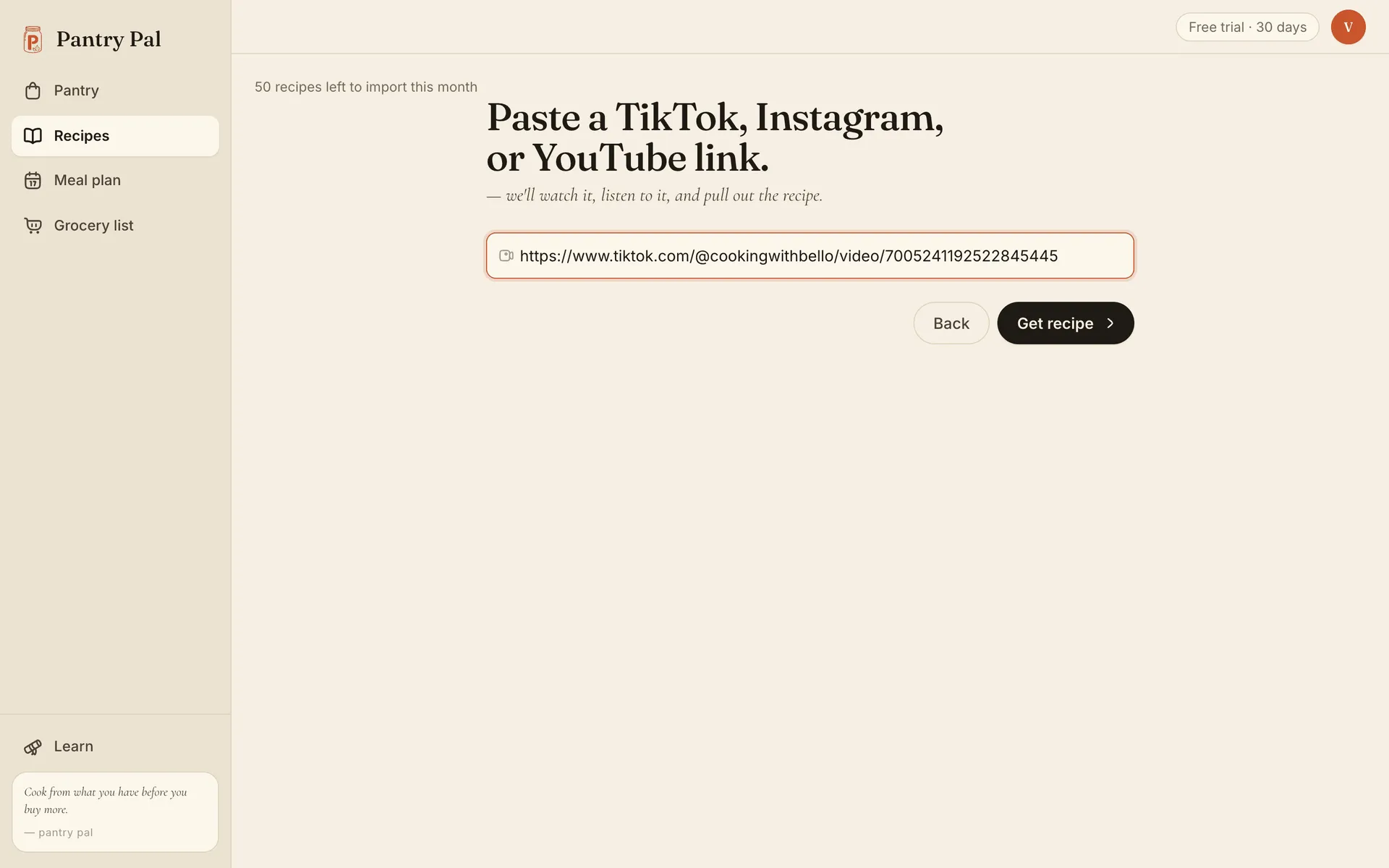
Nothing saves until you’ve checked it. The recipe lands on a review screen where you can fix a misheard quantity or drop a step that was really just “link in bio”.
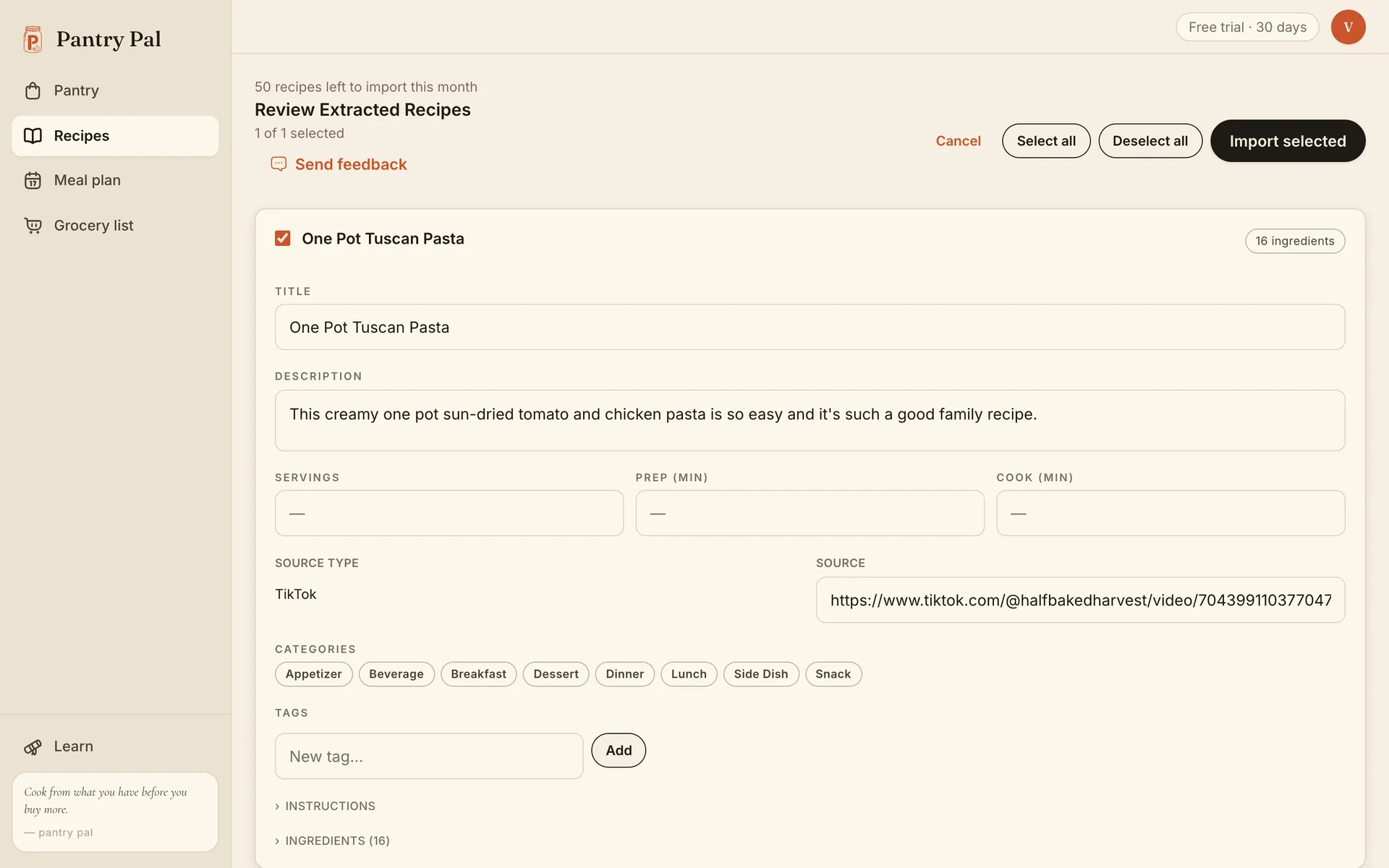
Once it’s saved, the recipe sits in the same cookbook as the ones you pasted from websites and photographed from cookbooks, and Pantry Pal sorts them by how much of each you already have in your pantry. New households get 30 days of everything, with 50 imports a month. After that the free plan includes 5 imports a month, and an import only counts when you save. Pro ($6.99 a month or $39.99 a year) makes imports unlimited. The full walk-through is in how to save a recipe from a TikTok video.
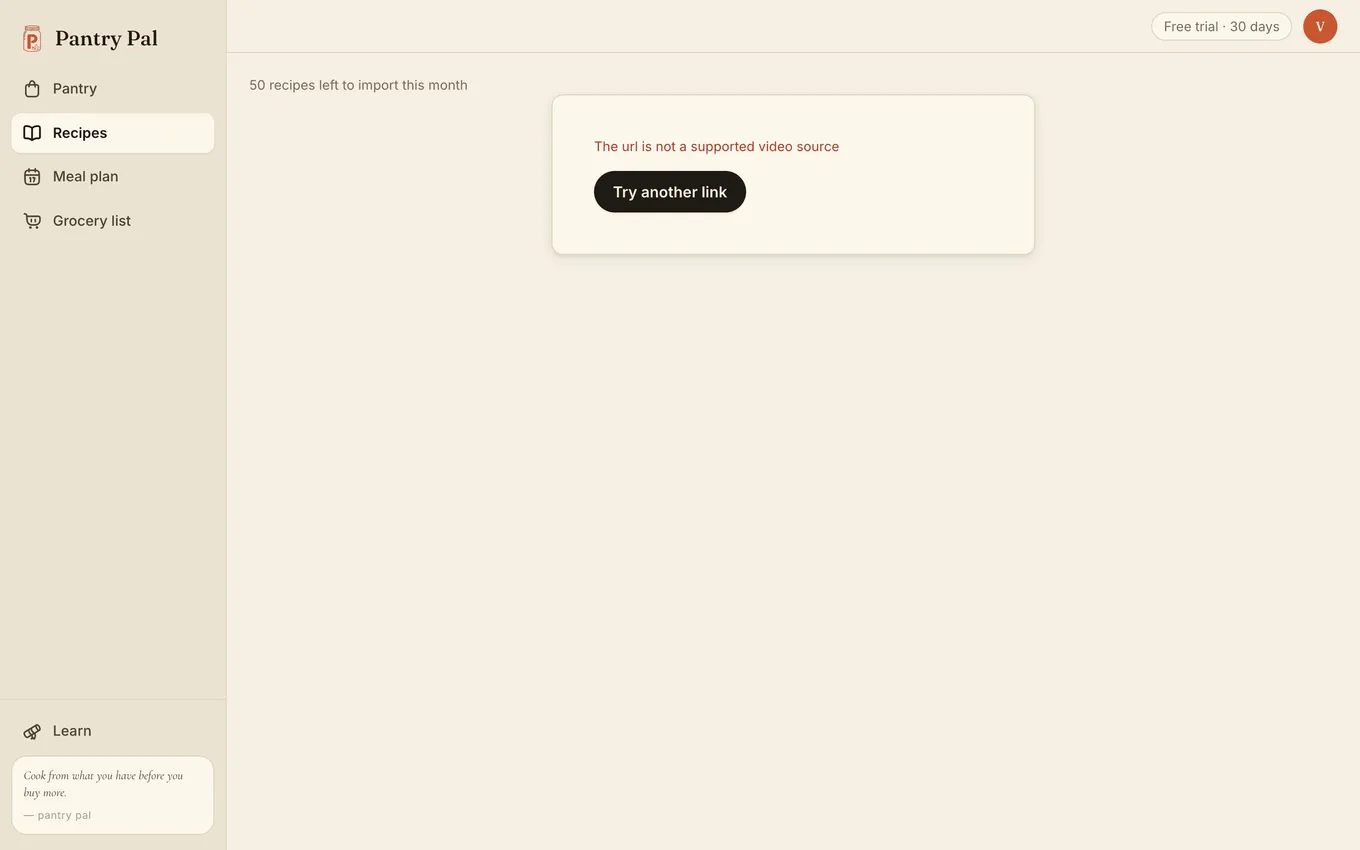
The catch is the platform list, and it’s the biggest catch on this page. Pantry Pal doesn’t import from Facebook. People search for Facebook recipes more than for any other platform here, and our video importer turns Facebook links away. Pasting one into the URL importer instead brings back the post’s title and no recipe. Pinterest does the same: you get the pin’s title, not the recipe behind it, so open the pin’s source site and paste that link. There’s no share sheet either, because there’s no native iPhone or Android app yet; you copy the link and paste it into the browser. Pro costs more than ReciMe Plus or CookBook Pro. If your recipes mostly come from Facebook, pick one of the first three apps.
Group 2: apps that read the caption
These two save from all the big platforms, but they read what the creator typed, not what they said. That works well when the recipe is in the caption or behind a link, and badly when it’s only spoken.
CookBook: best for importing from everywhere, on every device
Best for: wide coverage on phone and computer. CookBook imports from Instagram, TikTok, Facebook posts and Reels, YouTube and Pinterest, plus websites, PDFs and photos of cards and cookbook pages. In its own words, it “pulls the recipe from the caption - or follows any link in the post if the caption is empty”; it doesn’t claim to read the audio. You save from the share sheet, by pasting a link, or with a Chrome or Edge extension. It runs on iOS, Android and the web, and rates 4.8 from about 2,700 US App Store reviews.
The catch is the free plan, which stops at 20 recipes and 20 imports in total, not per month. Pro is $6.99 a month or $39.99 a year, and meal planning is Pro-only.
Paprika 4 (beta): best if you already own Paprika
Best for: existing Paprika users. Paprika 4 opened a public beta to current owners on 28 September 2026, and its guide says it “reads the recipe from the text of the post, including its caption or description” on TikTok, Instagram, Facebook and YouTube. You share a post to Paprika or paste its link into Paprika’s built-in browser. It runs on iPhone, iPad, Mac, Android and Windows. Paprika also keeps a pantry, with quantities and expiry dates, so saved recipes sit next to a list of what you own.
The catch is that it’s a beta. Social import is a Premium feature, free while the beta lasts, and no Premium price or release date has been published. The guide never mentions audio, so a recipe that’s only spoken won’t come through. Pinterest isn’t named. Paprika 3, the version the app stores sell today, has no social import at all.
Group 3: apps that don’t publish how they do it
Both of these will take a shared post or link, but neither vendor says which platforms work or what gets read. Try them with a recipe you already know before you trust them with your collection.
AllSpice: best if you want a pantry on iPhone
Best for: iPhone users who want recipes, a grocery list and a pantry in one app. AllSpice’s blog names Instagram, TikTok and YouTube (“hit Share on any food video, paste the link into Allspice”), and it adds barcode pantry tracking, expiry alerts and recipes matched to what you have, which are Premium features. Premium is $7.99 a month or $59.99 a year, with a 7-day trial.
The catch is how little it publishes. Facebook and Pinterest aren’t mentioned, and the vendor doesn’t say whether it reads the caption or the video. The free plan caps imports without saying where. It’s iPhone only; Android has a waitlist and the web app is “coming soon”. It rates 4.7 from 149 US App Store reviews, not the “4.9” on its site.
Samsung Food: best free planner that also saves links
Best for: people who want free meal planning and shopping lists, and save recipes mostly from websites. Samsung Food (formerly Whisk) saves “any recipe from any website” by pasting a link, from a Chrome extension, or from its share extension, which works from “your favorite apps like Pinterest or Facebook”. Planning and lists are free; Food+ is $6.99 a month or $59.99 a year.
The catch for this job is that Samsung Food doesn’t publish TikTok, Instagram or YouTube import, or how it handles a Facebook post or a pin. Test it on a video recipe before you count on it.
Which one should you pick?
- Your recipes come from Facebook → ReciMe, Deglaze or Plan to Eat.
- You want to save from every platform for free → ReciMe.
- The recipe is only spoken in the video → Deglaze, or ReciMe.
- You plan the week from what you save → Plan to Eat, or ReciMe on its free plan.
- You want the widest import list on phone and computer → CookBook.
- You already own Paprika → join the Paprika 4 beta.
- You want TikTok, Instagram and YouTube recipes matched to what’s in your pantry → Pantry Pal.
If you’d rather not install anything, the manual method still works: pause, check the caption and the pinned comment, and type it out. And when the post only links to a recipe on a blog, save it from the website instead; that’s usually the better copy anyway.
Frequently asked questions
What is the best free app to save recipes from social media?
ReciMe has the most generous free plan for social recipes: 5 imports a week from Facebook, Instagram, TikTok, YouTube and Pinterest, with meal plans and grocery lists included. CookBook is free for your first 20 recipes. Deglaze has a free weekly import cap but does not publish the number. Pantry Pal is free for 5 imports a month after a 30-day trial, and does not import from Facebook.
How do I save a recipe from Facebook?
Tap Share on the post or Reel and send it to an app that imports from Facebook. ReciMe, Deglaze, CookBook and Plan to Eat all say they take Facebook posts and Reels, and the Paprika 4 beta lists Facebook on its Premium plan. Without an app, open the post, copy the recipe from the caption and paste it into your notes. If the recipe is only spoken in the video, you have to write it down while you watch.
Which apps read the video and not just the caption?
ReciMe falls back to the video audio when the caption has no recipe. Deglaze says it transcribes the audio and reads text overlays. Plan to Eat transcribes the audio and reads on-screen text on Instagram and Facebook. Pantry Pal reads the caption first and works from a transcript of the audio when the caption is not enough. CookBook and the Paprika 4 beta read the caption or the page it links to.
Can I save Instagram Reels and TikTok recipes for free?
Yes, within limits. ReciMe allows 5 imports a week, CookBook 20 recipes in total, Deglaze an unpublished number each week, and Pantry Pal 5 imports a month. AllSpice and Samsung Food are free to download; AllSpice caps imports without publishing the number. Plan to Eat has a 14-day trial but no free plan.
Does Pantry Pal save recipes from Facebook?
No. Pantry Pal imports from TikTok, Instagram posts and Reels, and YouTube videos and Shorts. Facebook posts and Reels are not supported, and a Facebook link pasted into the URL importer brings back the post title without the recipe. Copy the caption and use Paste the text instead.