From the blog
Best Meal Planning Apps With a Grocery List (2026)
Eight meal planning apps and a free template, compared on how the plan becomes a grocery list and whether the list leaves off what you already have. Checked October 2026.
Last updated
Every meal planning app makes a grocery list. The differences are who picks the recipes, whether the list knows what’s already in your kitchen, and whether the rest of your household can open the same plan. Those three questions sort the nine options below.
Already know you want a plan that starts from what you have? Skip the comparison and see Pantry Pal’s meal planner. Meal planning is part of Pro, and every new account gets it free for 30 days, no credit card. Everyone else, read on.
Which meal planning app has the best grocery list?
eMeals is the best pick if you want someone else to write the menu, with new dinners every week, a list sorted by store, and ordering through Walmart, Kroger and other grocers. Samsung Food is the best free planner. Plan to Eat is the most complete planner for your own recipes. AnyList has the best shared list. Paprika, Cooklist and Pantry Pal keep a pantry and leave what you already have off the list. Mealime was the favourite free option, but it closed on 21 October 2026.
The nine options, side by side
Every price, platform and feature below was checked against each vendor’s own site and app store listings on 13 October 2026. Prices are in US dollars.
| App | Who picks the recipes | How the plan becomes a list | Leaves off what you have? | Household | Platforms | Price |
|---|---|---|---|---|---|---|
| eMeals | eMeals: 7 new dinners a week, 15 plan styles | Automatic, sorted by store, order from 6+ grocers | No, you tick off what you have | Not published | iPhone, Android | 14-day trial, then $59.99/yr for dinners |
| Samsung Food | Its recipe database, or yours | One tap, you pick lines, by aisle, order online | No, its pantry is not linked to the list | Separate accounts, live sync | iOS, Android, web | Free; Food+ $6.99/mo or $59.99/yr |
| Mealime | Mealime’s own recipes | Automatic, by aisle | No, you tick off what you have | One shared login | Closed | Discontinued 21 Oct 2026 |
| Plan to Eat | You: web, social video, photos | Automatic from a date range, by aisle, per store | No, its pantry was removed on purpose | One shared login | iOS, Android, web | 14-day trial, then $5.95/mo or $49/yr |
| AnyList | You: web, pasted text, Paprika files | You pick the lines from a date range, merged | No | Separate accounts, free | iOS, Android; web and Mac on Complete | Free list; planning on Complete, $9.99 or $14.99/yr |
| Paprika 3 | You: web pages, other apps’ files | Merged, by aisle | Pantry items left unchecked | One shared login | iOS, Android, Mac, Windows | $4.99 iPhone/Android, $29.99 Mac/Windows, once each |
| Cooklist | Its 1M-recipe database, AI, or your imports | Only the missing ingredients, by aisle | Yes, pantry filled from loyalty cards | Shared list, pantry, recipes | iOS, Android | Free with ads; Pro price not published |
| Template | You | By hand | You check the cupboard | Anyone with the file | Paper, notes, spreadsheet | Free |
| Pantry Pal | You: your saved recipes, sorted by pantry match | One tap, merged, by store section | Yes, pantry items never show | Separate logins, up to 6 | Web app (any browser) | Free to start; meal planning on Pro, $6.99/mo or $39.99/yr |
Group 1: the app supplies the recipes
These start from the vendor’s recipes. You choose from a menu or a library, and the list builds itself from what you chose. None of them checks your cupboards when it builds the list, so you tick off what you have before you shop.
eMeals: best if you want the menu written for you
Best for: households that want dinner decided by someone else. eMeals publishes 7 new dinner recipes for each of its 15 plan styles every Wednesday, written by its own food team and dietitians, and you choose 3 to 7 of them. You can also pull meals from past weeks, other plans and a library of more than 20,000 recipes. The grocery list builds itself from your picks, merges quantities and sorts by store location, and you can send it to Walmart, Kroger’s stores, Albertsons, Safeway, Instacart or Amazon Fresh for pickup or delivery, depending on your zip code.
The catch is that it’s paid from day one. There’s a 14-day trial that asks for a card, then dinner plans are $59.99 a year; breakfast and lunch are extra. There’s no pantry. Its own help centre tells you to tick off each week “any ingredient you already have on hand,” and those ticks don’t carry over. The App Store listing says “Only for iPhone” (there’s an Android app too), and eMeals doesn’t publish any way to share a plan with your household.
Samsung Food: best free meal planner with a grocery list
Best for: a free planner with a big recipe library behind it. Samsung Food, which used to be Whisk, has a database the App Store listing puts at 240,000 recipes, and you can plan with those or with your own, saved from a link, a Chrome extension, the share sheet or a photo scan. Planning, shopping lists, sharing and online ordering are on the free plan. One tap adds a plan to the list, where you pick the ingredients, and the list merges them and sorts by aisle or by recipe. Each person has their own account, and shared lists and plans update for everyone as you edit. You don’t need a Samsung phone; it runs on iPhone, Android and the web.
The catch is in the limits. The free plan keeps 3 saved meal plans and 3 photo scans, and the AI-tailored weekly plans need Samsung Food+, at $6.99 a month or $59.99 a year. It has a pantry, the Food List, with locations and use-by dates, but the shopping list doesn’t check it. Moving items between the two is a manual step, and a Food+ one. On phones, sign-in is moving to a Samsung Account (free, and it works on an iPhone). Its last blog post was in March 2025.
Mealime: closed on 21 October 2026
Mealime was the free answer to this question for years. You picked from its in-house recipes, filtered by diet and dislikes, and got a list grouped by aisle. Its own notice says the app is “discontinued as of October 21, 2026.” Albertsons, which bought it in 2021, is moving users to Meals Hub inside its grocery store apps, and Mealime says “all personal data will be deleted” when the app shuts down. We haven’t reviewed Meals Hub yet, so it isn’t on this list.
Group 2: you bring the recipes, you tick off what you have
These two plan from recipes you saved yourself. Both build a merged, aisle-sorted list from the plan. Neither keeps a pantry, so the step of checking your shelves is yours.
Plan to Eat: best planner for your own recipes
Best for: people with a big recipe collection who want a real calendar. Plan to Eat imports from websites with a browser extension, from Instagram, Facebook, TikTok and YouTube (it transcribes spoken recipes and reads on-screen text), from photos, and from Mealime, Yummly, Copy Me That and MasterCook. The planner is a drag-and-drop calendar of any length, with saved menus, leftovers and frozen meals. The shopping list builds itself from whatever date range you pick, combines items with matching units, sorts by aisle and keeps a tab per store. It runs on iOS, Android and the web on one plan, and a redesigned version 4 shipped in September 2026.
The catch is the pantry, which they removed on purpose. Plan to Eat had one early on, and its own help centre explains why it went: “Removing items from someone’s shopping list without them knowing about it is never a good idea.” Its advice now is to “shop at home first.” Its Staples list is items you buy often, copied onto the list by hand. There’s no free plan: after a 14-day trial with no card, it’s $5.95 a month or $49 a year on the website ($54.99 a year in the iPhone app). Families share one login. (We compared it with Pantry Pal in detail in Pantry Pal vs Plan to Eat.)
AnyList: best shared grocery list, with planning on top
Best for: households where more than one person shops. AnyList started as a grocery list, and it’s still the best one here: each person has their own account, lists sync instantly, and sharing a list is free. AnyList Complete adds the meal planner, the web and Mac apps, and Apple Watch. You plan with your own recipes, saved from websites through browser extensions and the share sheet, pasted as text, or imported from Paprika. To build a list, you pick a date range and AnyList shows every ingredient; you tap the ones you need or add them all, and similar items combine into one line with the total. In the US you can send the list to Instacart, Walmart, Kroger and other stores from the phone apps. It rates 4.9 from over 80,000 reviews on the US App Store.
The catch is that planning isn’t free. Every meal-plan feature needs AnyList Complete, which is $9.99 a year for one person or $14.99 a year for a household, the cheapest subscription here. The free plan saves 5 web recipes. AnyList has no pantry and doesn’t publish social media or photo import. (Our Pantry Pal vs AnyList page goes through the differences.)
Group 3: the list checks your pantry
These keep a list of what you own and use it when they build the shopping list, so the planning starts from your kitchen instead of a blank week. That’s the answer to the forum question “what apps help with meal planning using groceries on hand?” The pantry is only as good as you keep it, in all three.
Paprika: best one-time purchase with a pantry
Best for: people who want to pay once. Paprika 3 has a meal planner, a grocery list that merges ingredients and sorts by aisle, and a pantry that records quantity, purchase date and expiry date for each item. In its own words, “ingredients placed in your pantry will automatically be unchecked when you add recipes or meal plans to your grocery list,” so they stay visible but unticked. After a shop, “Move to Pantry” restocks the pantry from the items you bought. You save recipes from websites through its built-in browser or a bookmarklet. It’s $4.99 on iPhone, a $4.99 unlock on Android, and $29.99 each on Mac and Windows.
The catch is that Paprika is between versions. Paprika 4 opened a public beta on 28 September 2026. Its guide says the grocery list will compare pantry quantities, and a Premium subscription will add social media and photo import and separate family logins. No Premium price or release date has been published, so today you’re buying Paprika 3, where a household shares one login and recipes come in from web pages and other apps’ files only.
Cooklist: best if your groceries come from a loyalty card
Best for: US shoppers who’d rather not type a pantry at all. Cooklist connects to store loyalty cards and pulls your purchases into a pantry, then matches over a million recipes to what you have and lists “only the ingredients that you are missing,” sorted by aisle. It has an AI meal planner, a barcode scanner, and household sharing of the list, pantry and recipes. It’s on iOS and Android, free with ads.
The catch is momentum. Cooklist’s home page now sells AI shopping assistants to grocery chains (Kroger’s went live in December 2025), and the consumer app hasn’t had a feature release since February 2025; recent updates are store-connection fixes. The Pro price isn’t published. Whether the loyalty-card sync works for your store is worth testing before you rely on it.
Pantry Pal: best for planning from the recipes and food you already have
Best for: people who already have recipes they like and a kitchen that’s half full, and want the week planned around both. Pantry Pal is our app. The meal plan is a week of seven days with breakfast, lunch, dinner and snack, and every meal on it is one of your own saved recipes. When you add one, the picker sorts your cookbook by how much of each recipe your pantry already covers, and each planned meal shows the percentage.
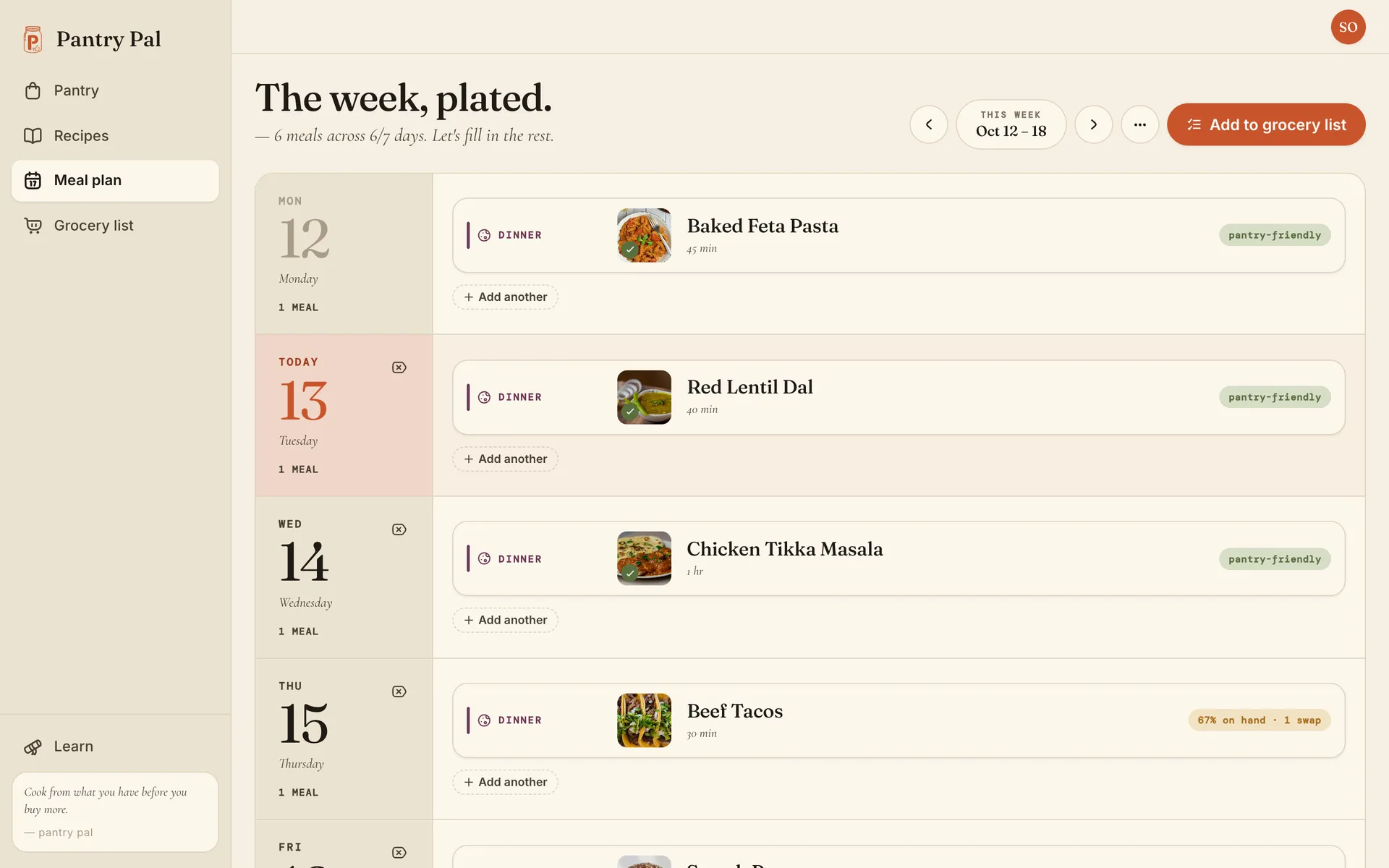
Add to grocery list shows every planned meal with what it still needs before anything is written: “all on hand,” or how many ingredients to grab. Untick the meals you’re not shopping for.
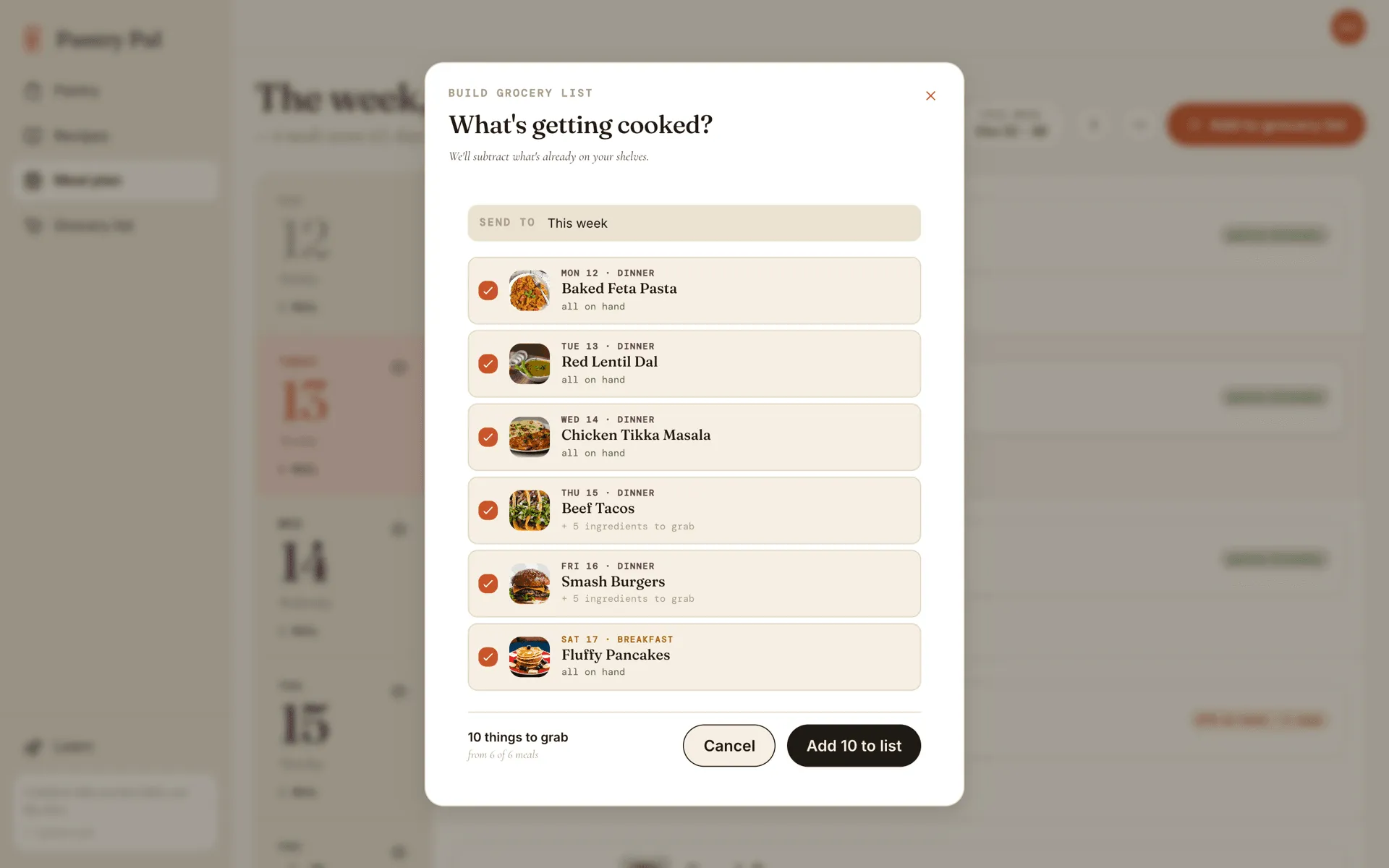
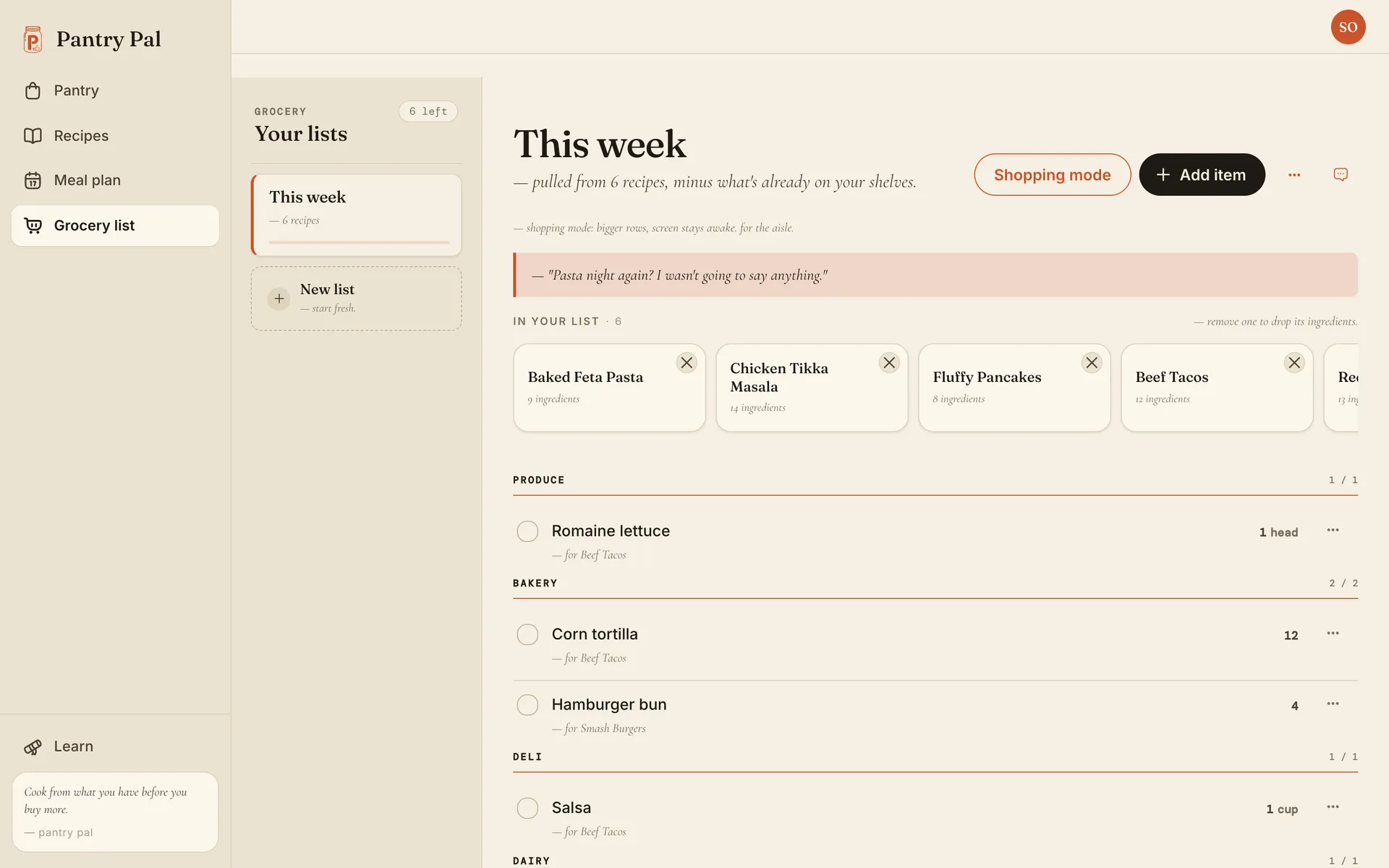
The list that comes out merges quantities across recipes, sorts by store section in the order you set, and leaves off anything already in your pantry. Here, six recipes calling for 47 different ingredients came down to 10 things to buy.
Everyone in your household gets their own login on the same pantry, recipes, plan and lists, so whoever shops sees the same list as whoever planned. You bring recipes in by pasting a link, saving a TikTok, Instagram or YouTube video, photographing a cookbook page, uploading an EPUB or PDF, or pasting text.
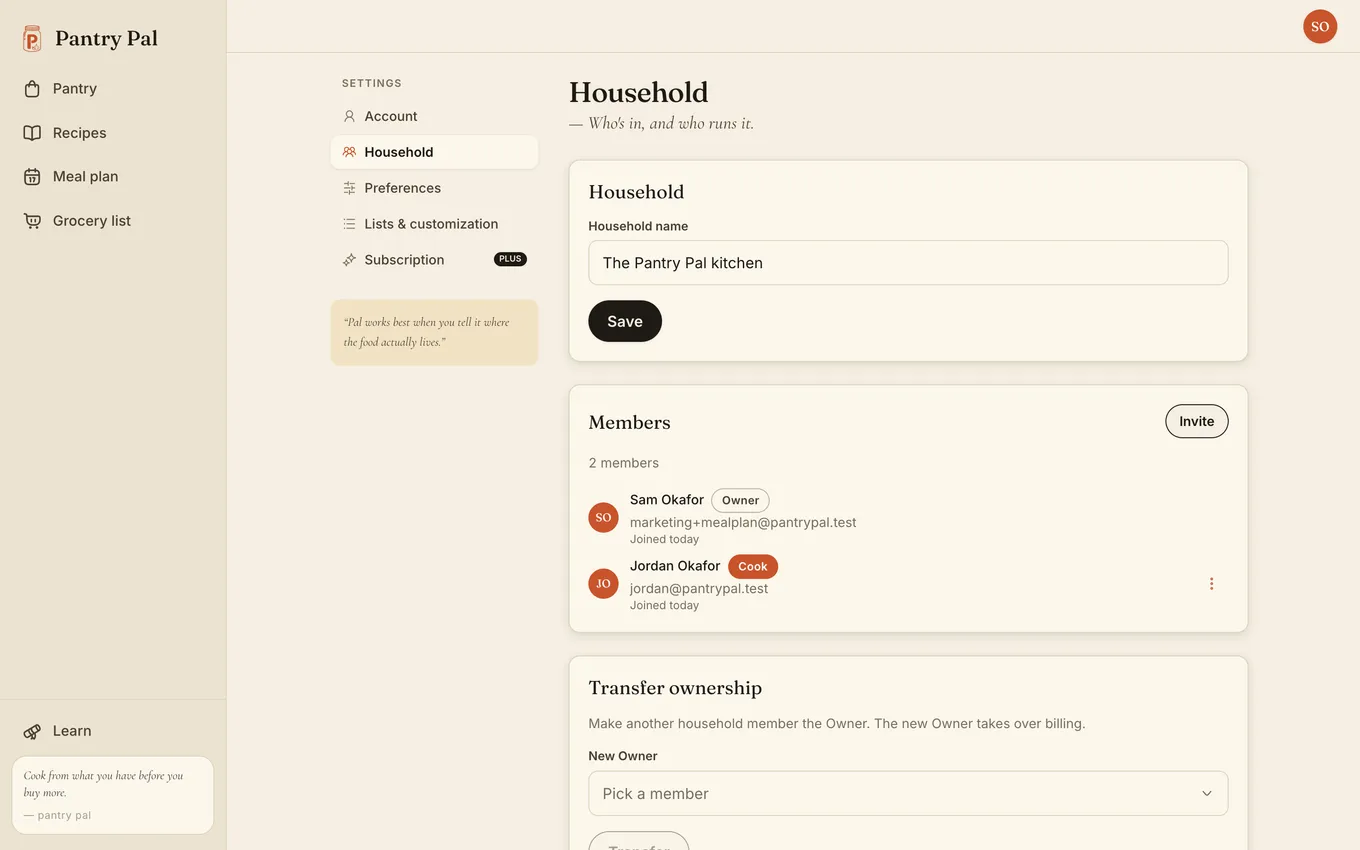
It’s free to start with no credit card, and every new household gets 30 days of everything. After that, meal planning is a Pro feature. The free plan keeps the pantry, your recipes, one grocery list and two people, and you can still add recipes to the list one at a time. Pro is $6.99 a month or $39.99 a year and adds the meal plan, more lists and up to six people.
Now the catches. There’s no native iPhone or Android app yet; it’s a web app that runs in any browser. The planner is simpler than Plan to Eat’s or eMeals’: one week at a time, your own recipes only, no generated plans, no printing or sharing the plan, no notes or leftovers entries, and no store ordering. The pantry only stays current if you keep it current, and the list’s check is all or nothing. If flour is in your pantry, flour stays off the list, however little is left. Pro costs more than AnyList, and more than Plan to Eat if you pay by the month. If you’d rather the app chose your dinners, Group 1 will suit you better.
The free option: a meal planner with grocery list template
Best for: anyone who wants the method without the app, or a household that won’t all install the same one. This is the shape every app above automates. Copy it into a notes app or a spreadsheet:
| Day | Meal | Recipe | Needs (not already in the kitchen) |
|---|---|---|---|
| Monday | Dinner | ||
| Tuesday | Dinner | ||
| Wednesday | Dinner | ||
| Thursday | Dinner | ||
| Friday | Dinner | ||
| Saturday | |||
| Sunday |
Then the list, one line per ingredient, grouped the way your store is laid out: Produce · Meat and fish · Dairy · Bakery · Pantry shelf · Frozen · Other.
Fill it in this order. Write the meals first, and plan the ones that use up what’s already open early in the week. Then open each recipe and write down only what you don’t have, after looking in the cupboard, not from memory. Last, move each item into its store section and merge the duplicates, so two recipes asking for an onion become “onions, 2.” We wrote up the whole method, with the mistakes that make lists go wrong.
The catch is that you do the checking every week, and it’s the step that gets skipped when you’re tired. That’s the step the apps in Group 3 do for you.
Which one should you pick?
- You want someone else to decide what’s for dinner → eMeals.
- You want a free planner with a big recipe library → Samsung Food.
- You have your own recipes and want a full calendar → Plan to Eat.
- Two or more people shop from the same list → AnyList.
- You want to pay once → Paprika 3, knowing Paprika 4 is coming.
- You want planning to start from what’s already in your kitchen, and the list to leave it off → Pantry Pal.
- You don’t want an app at all → the template above.
If the list is the part you care about most, our grocery list app page shows how Pantry Pal’s list works on its own, without a meal plan. And if what you need tonight is one dinner rather than a week, here are the apps that find recipes from the ingredients you have.
Frequently asked questions
What is the best meal planning app with a grocery list?
It depends on who picks the recipes. If you want the menu written for you, eMeals sends new dinners every week and turns your picks into a list you can order from a store. Samsung Food is the best free planner, with a large recipe library. If you bring your own recipes, Plan to Eat has the most complete planner and AnyList has the best shared list. If you want the list to leave off what you already have, Paprika, Cooklist and Pantry Pal keep a pantry and check the list against it.
Is there a meal planning app that uses the groceries I already have?
Yes, three of the apps here keep a pantry and use it on the grocery list. Paprika unchecks pantry items when you add a meal plan to the list. Cooklist fills its pantry from store loyalty cards and lists only the ingredients you are missing. Pantry Pal sorts your recipes by how much of each your pantry covers when you plan, and leaves pantry items off the list. Samsung Food has a pantry too, but its list does not check it. Plan to Eat, AnyList and eMeals ask you to tick off what you have by hand.
Is there a free meal planning app with a grocery list?
Samsung Food is the best free one. Meal planning, shopping lists, sharing and online ordering are all on its free plan, which keeps up to 3 saved meal plans. Mealime was the other free favourite, but it shut down on 21 October 2026. AnyList and Pantry Pal have free plans, but meal planning is on their paid plans. Plan to Eat and eMeals are paid after a 14-day trial. If you do not want an app at all, the free template in this post does the same job on paper.
Which meal planning app is best for families?
Look for separate logins on one shared plan and list. AnyList gives each person their own account on a shared list for free, and its Household plan is $14.99 a year. Samsung Food gives each person an account and updates shared plans and lists live, for free. Pantry Pal gives everyone in the household their own login on the same pantry, plan and lists. Plan to Eat and Paprika 3 expect the household to share one login, and eMeals does not publish any sharing.
What happened to Mealime?
Mealime says the app is discontinued as of 21 October 2026. Albertsons, which owns it, is moving users to Meals Hub inside its grocery store apps. Its notice says all personal data is deleted when the app shuts down. Plan to Eat lists Mealime among the apps it can bulk-import from.
Is there a free meal planner template with a grocery list?
Yes, the template in this post. It is one table for the week, with a column for what each meal needs that is not already in your kitchen, and a short list sorted by store section underneath. Copy it into a notes app or a spreadsheet. The step that keeps it accurate is checking the pantry before you write the list, not after.